This article lists the license details in different regions required by Booking.com. To create a listing on Booking.com, you must follow the guidelines in regional requirements specific to your property location.
-
If you are exempt from licensing:
- Check in the This property does not have a licence number checkbox.
-
If you are not exempt:
- Provide Licence number in the text box.
-
If you are exempt from licensing:
- Check in the This property does not have a licence number checkbox.
- Click Add legal information button.
- Then, from Additional legal info dropdown, select the Exemption reason option.
- Long term bookings only
-
If you are not exempt:
- Provide Licence number in the text box.
-
If you are not exempt:
- Provide Licence number in the text box. It is your tax ID (CNP or CPF).
- Click Add legal information button.
- Then, from Additional legal info dropdown, provide the following.
- City Hall Info ID
- Manager type (individual or company)
- Provide the following:
- Email ( Company profile )
- Birthday ( Company profile ) - it is required only if the property is managed by a private individual, otherwise it may be skipped.
-
If you are not exempt:
- Company Profile: Legal representative information
- First name
- Last name
- Address (street name and number, city, post code)
- Provide Licence number in the text box.
- Click Save .
- Company Profile: Legal representative information
-
If you are exempt from licensing:
- Check in the This property does not have a licence number checkbox.
-
If you are not exempt:
- Provide Licence number in the text box.
- Provide Licence expiry date.
- Click Add legal information button.
- From Additional legal info dropdown, provide the follwoing:
- Address as on licence: Provide the street name
- Street number: Provide street number
- Unit number: Provide apartment number
- From Additional legal info dropdown, select Licence type and select one of the following options:
- Canada - General Tourist Accommodation Establishment
- Canada - Principal Residence Establishment
- Canada - Youth Tourist Accommodation Establishment
- Click Save .
-
If you are exempt due to long-term rent:
- Check in the This property does not have a licence number checkbox.
- Click Add legal information button.
- Then, from Additional legal info dropdown, select the Exemption reason option.
- Long term bookings only
- Click Save .
The City of Toronto requires short-term rental operators to provide their City registration numbers and for platforms like Booking.com to report data about these listings and operators. If hosts do not consent to data sharing, their properties will be removed from the platform. More details can be found in the Partner Hub and the consent form .
When providing the first and last name of the registration number holder and listing address details, please make sure that they exactly match your property registration details with the City of Toronto. Failure to provide identical information to your City registration may result in a removal of your listing. This information will not be displayed on your property page.
-
If you are not exempt:
- Company Profile: Legal representative information
- Company Profile: Company name
- Step 1: Basic info: Street treets number
- Provide Licence number in the text box.
- Click Add legal information button.
- From Additional legal info dropdown, select Canada - Consent.
- Click Save .
-
If you are not exempt:
- If your property type is Hotel
- Provide Licence number in the text box.
- Click Add legal information button.
- From Additional legal info dropdown, select Licence type and set it to Hotel.
- Click Save .
- If you have a Touristic Accommodation
- Provide Licence number in the text box.
- Click Add legal information button.
- From Additional legal info dropdown, select Licence type and set it to Touristic Accommodation.
- Click Save .
- Other cases:
- Provide Licence number in the text box.
- Click Save .
- If your property type is Hotel
-
If you are exempt from licensing:
- If your property type is Hotel
- Check in the This property does not have a licence number checkbox.
- Click Add legal information button.
- Then, from Additional legal info dropdown, select the Exemption reason option.
- Select Hotel or motel.
- Click Save .
- If you have a Touristic Accommodation
- Check in the This property does not have a licence number checkbox.
- Click Add legal information button.
- Then, from Additional legal info dropdown, select the Exemption reason option.
- Select Cyprus.
- Click Save .
- Other cases:
- Check in the This property does not have a licence number checkbox.
- Click Save .
- If your property type is Hotel
-
If you are exempt from licensing:
- Check in the This property does not have a licence number checkbox.
- Click Add legal information button.
- Then, from Additional legal info dropdown, select the Exemption reason option.
- Select one of the following reasons:
- France - Mobility lease
- France - Dependent room
- Bed and breakfast
-
If you are not exempt:
- Click Add legal information button.
- Then, from Additional legal info dropdown, provide all the licence information related to France:
- France - City tax category
- France - Property type for tax purposes
- France - Revenue declaration as professional for direct tax purposes (see article 155 IV du CGI)
- France - Star rating of the property
- France - Type of residence
- Is this property managed by the owner?
- VAT Registration
- Registration at Registre du Commerce et des Societes
-
Provide Manager type (individual or company).
Depending on the information you select, you need to provide additional information, as follows:
- Manager type (individual or company): Individual person
- Provide Licence number in the textbox.
- Click Add legal information button and add France - Type of residence.
- Provide the following:
- Legal Representative data ( Company profile )
- Address ( Company profile )
- Manager type (individual or company): Company
- Provide Licence number in the textbox.
- Click Add legal information button and add France - Type of residence.
- Provide the following:
- Company Name ( Company profile )
- Address ( Company profile )
- Manager type (individual or company): Individual person
-
If you are exempt from licensing:
- Check in the This property does not have a licence number checkbox.
- Click Add legal information button.
- Then, from Additional legal info dropdown, select the Exemption reason option.
- Select one of the following reasons:
- France - Mobility lease
- France - Dependent room
- Bed and breakfast
-
If you are not exempt:
- Provide Licence number in the textbox.
- Click Add legal information button.
- Then, from Additional legal info dropdown, select:
- Manager type (individual or company)
- France - Type of residence.
- Click Save .
- Provide the following:
- Company name (when managed by a company) ( Company profile )
- Legal representative information (when managed by an individual person) ( Company profile )
- Address ( Company profile )
-
If you are exempt from licensing:
- Check in the This property does not have a licence number checkbox.
- Click Add legal information button.
- Then, from Additional legal info dropdown, select the Exemption reason option.
- Select one of the following reasons:
- Greece - Boat
- Greece - Leasing
- Greece - Mt Athos
- Greece - Public state property
- Greece - Right habitation
- Greece - Trailer Mobile Home
-
If you are not exempt:
- Provide Licence number in the text box.
- Click Add legal information button.
- Then, from Additional legal info dropdown, select the Licence type option.
- Select one of the following types:
- Greece - Short Term Lease Register
- Greece - EOT
- Greece - MAG
- Provide Licence number in the text box.
- Click Add legal information button.
- Provide Hawaii - Transient Accommodations Tax number.
-
If you are not exempt:
- Provide Licence number in the text box.
- Click Add legal information button.
- From Additional legal info dropdown, select the Hungary Property Type option.
- Select one of the following types:
- Campsite
- Community accommodation
- Holiday cottage resort
- Hotel
- Other accommodation
- Other accommodation rural
- Pension
- Private accommodation
- Private accommodation rural
-
If you are exempt from licensing:
- Check in the This property does not have a licence number checkbox.
-
If you are not exempt:
- Provide Licence number in the text box.
-
If you are not exempt:
- Provide Licence number in the text box.
-
If you are not exempt:
- Click Add legal information button.
- From Additional legal info dropdown, select Italy - National Identification Number (CIN) and provide the National Identification Number.
- Certain regions may additionally require Regional Identification Number (CIR). In this case, provide it in the Licence number text box.
- Click Save .
-
If you are still in the process of obtaining your licence:
- Check This property does not have a licence number .
- Click Add legal information .
- From Additional legal info dropdown, select the Exemption reason option.
- Select Licence application pending.
- Click Save .
-
If you are not exempt:
- Click Add legal information button.
- From Additional legal info dropdown, select Italy - National Identification Number (CIN) and provide the National Identification Number.
- Certain regions may additionally require Regional Identification Number (CIR). Provide Regional Identification Number (CIR) in the Licence number text box.
- Click Save .
- Click Add legal information .
- From Additional legal info dropdown, select the Exemption reason option.
- Select Sicily - Licence in progress.
- Click Save .
-
If you are not exempt:
- Click Add legal information button.
- From Additional legal info dropdown, select Italy - National Identification Number (CIN) and provide the National Identification Number.
- Provide Regional Identification Number (CIR) in the Licence number text box.
- Click Save .
- Click Add legal information button.
- Set Japan - Licence type to one of the following options:
- Minpaku Shinpo
- Minpaku Tokku
- Ryokan
-
If you are not exempt:
- Provide Licence number in the text box.
-
If you are not exempt:
- Provide Licence number in the text box.
-
If you are exempt from licensing:
- Check in the This property does not have a licence number checkbox.
- Click Add legal information button.
- Then, from Additional legal info dropdown, select the Exemption reason option.
- Netherlands - Recreation property
- Netherlands - Exemption or permit obtained under municipal rules
- Netherlands - This property is not a main/registered residence
- Netherlands - Renting only partial property
- Netherlands - Other
- Bed and breakfast
-
If you are not exempt:
- Provide Licence number in the text box.
-
If you are exempt from licensing:
- Check in the This property does not have a licence number checkbox.
- Click Add legal information button.
- Then, from Additional legal info dropdown, select the Exemption reason option.
- Netherlands - Exemption or permit obtained under municipal rules
- Netherlands - Other
-
If you are not exempt:
- Provide Licence number in the text box.
-
If you are exempt from licensing:
- Check in the This property does not have a licence number checkbox.
- Click Add legal information button.
- Then, from Additional legal info dropdown, select the Exemption reason option.
- Netherlands - Exemption or permit obtained under municipal rules
- Netherlands - This property is not a main/registered residence
-
If you are not exempt:
- Provide Licence number in the text box.
-
If you are exempt from licensing:
- Check in the This property does not have a licence number checkbox.
- Click Add legal information button.
- Then, from Additional legal info dropdown, select the Exemption reason option.
- Netherlands - Exemption or permit obtained under municipal rules
- Netherlands - This property is not a main/registered residence
- Netherlands - Other
-
If you are not exempt:
- Provide Licence number in the text box.
-
If you are exempt from licensing:
- Check in the This property does not have a licence number checkbox.
- Click Add legal information button.
- Then, from Additional legal info dropdown, select the Exemption reason option.
- Netherlands - Exemption or permit obtained under municipal rules
- Netherlands - This property is not a main/registered residence
- Netherlands - Other
-
If you are not exempt:
- Provide Licence number in the text box.
-
If you are exempt from licensing:
- Check in the This property does not have a licence number checkbox.
- Click Add legal information button.
- Then, from Additional legal info dropdown, select the Exemption reason option.
- Netherlands - Recreation property
- Netherlands - Exemption or permit obtained under municipal rules
- Netherlands - This property is not a main/registered residence
- Netherlands - Other
-
If you are not exempt:
- Provide Licence number in the text box.
-
If you are exempt from licensing:
- Check in the This property does not have a licence number checkbox.
- Click Add legal information button.
- Then, from Additional legal info dropdown, select the Exemption reason option.
- Long term bookings only
-
If you are exempt from licensing:
- Check in the This property does not have a licence number checkbox.
-
If you are not exempt:
- Provide Licence number in the text box.
- Click Add legal information button.
- Provide Licence issue date.
-
If you are not exempt and your property type is one of the following:
- All suite
- All-Inclusive resort
- Aparthotel
- Apartment
- Camping
- Condominium
- Hotel
- House
- Loft
- Private room in apartment
- Vacation home
- Resort
- Shared room
-
Villa
- Provide Licence number in the text box.
- Provide Licence expiry date.
- Click Add legal information button.
- From Additional legal info dropdown, select Licence type and set it to Saudi Arabia - Tourist.
-
If you are not exempt (any property type):
- Provide Licence number in the text box.
- Provide Licence expiry date.
- Click Add legal information button.
- From Additional legal info dropdown, select Licence type and set it to Saudi Arabia - Private.
-
If you are exempt from licensing:
- Check in the This property does not have a licence number checkbox.
-
If you are not exempt:
- Provide Licence number in the text box.
- Click Add legal information button.
- Provide UK - Energy Rating. The possible categories are from A to G .
-
If you have a pending application:
- Check in the This property does not have a licence number checkbox.
- Click Add legal information button.
- From Additional legal info dropdown, select the Exemption reason option.
- Select the following reason: Licence application pending.
For properties located in Spain, you must provide the obligatory information described below and regional requirements.
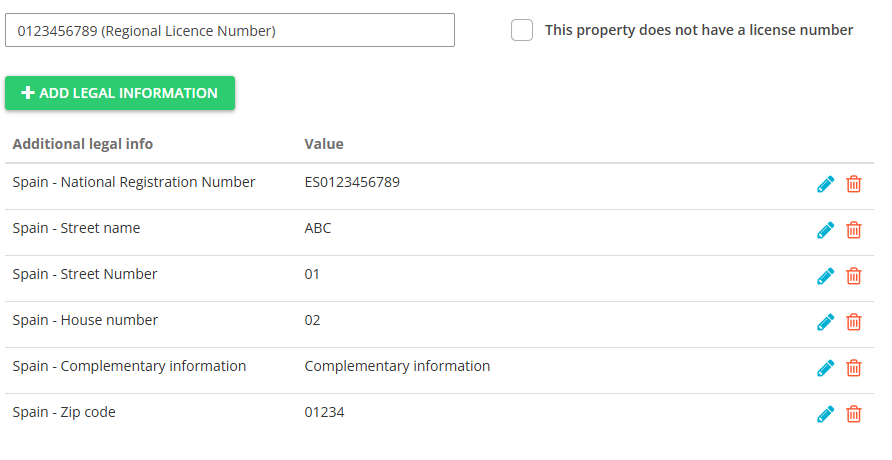
Include National Registry ID in the licence details for properties in Spain.
- Provide your Regional Licence Number in the licence number field.
- Click + Add legal information and provide the following:
- If you offer long-term stays, select Spain - National Registration Number (Longstay) and provide your National Registry ID.
- If you offer short-term stays, select Spain - National Registration Number and provide your National Registry ID.
- Spain - Street name (mandatory)
- Spain - Street number (mandatory)
- Spain - House number
- Spain - Complementary information
- Spain - Zip code (mandatory)
- Save.
If you do not have the National Registry ID, include the following licence details.
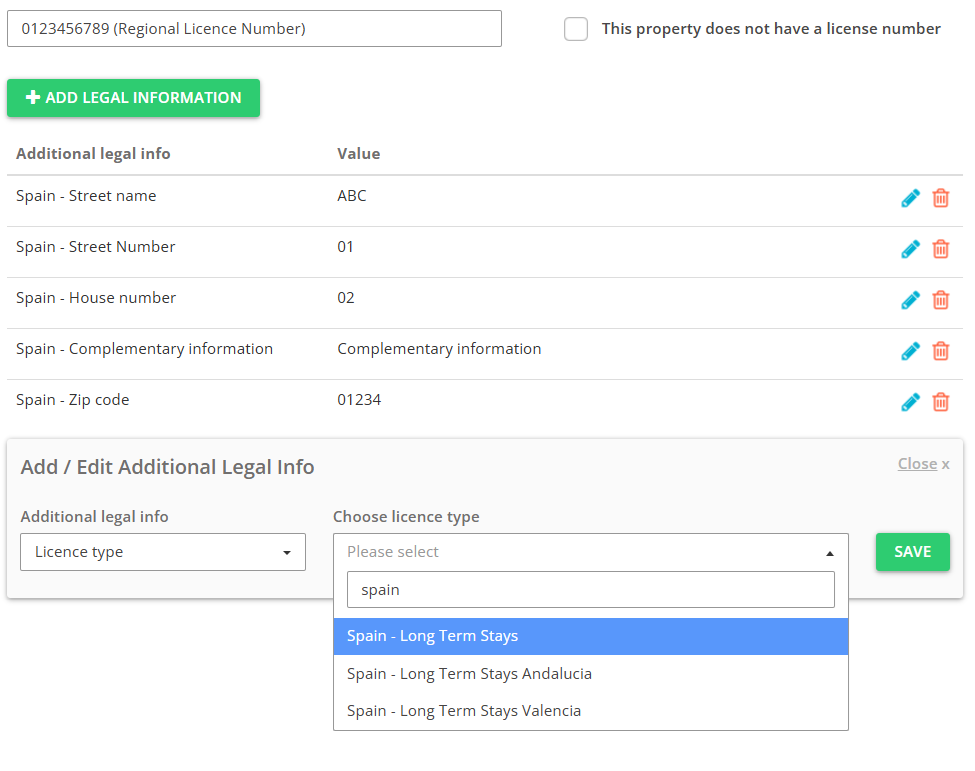
- Provide your Regional Licence Number in the licence number field.
- Click + Add legal information and select Licence type. Provide one of the following:
- If you offer long-term stays, select Spain - Long Term Stays.
- If you offer long-term stays in Valencia, select Spain - Long Term Stays Valencia.
- If you offer long-term stays in Andalusia, select Spain - Long Term Stays Andalucia.
- Provide the following:
- Spain - Street name (mandatory)
- Spain - Street number (mandatory)
- Spain - House number
- Spain - Complementary information
- Spain - Zip code (mandatory)
- Save.
-
If you have a temporary rental licence number:
- Provide your Regional Licence Number in the licence number field.
- Click + Add legal information and provide the following:
- Spain - National Registration Number and provide your National Licence Number
- Licence type and set it to Spain - Temporary Rental Licence Madrid
- Spain - Street name (mandatory)
- Spain - Street number (mandatory)
- Spain - House number
- Spain - Complementary information
- Spain - Zip code (mandatory)
- Save.
-
If you are exempt from licensing:
- Check in the This property does not have a licence number checkbox.
- Click Add legal information button.
- Then, from Additional legal info dropdown, select the Exemption reason option.
- Select one of the following reasons:
- Australia, Tasmania - Home sharing
- Australia, Tasmania - Land use
- Provide Legal information: Australia, Tasmania - City tax category.
-
If you are not exempt:
- Provide Licence number in the text box.
- Click Add legal information button.
- Provide Australia, Tasmania - City tax category.
-
If you are not exempt:
- Provide Licence number in the text box.
- Click Add legal information button.
- Provide one of the following license types:
- Turkey - Licence Number
- Turkey - Tourism License
- Turkey - Simple Accommodation License
- Turkey - Application Number
- Select Owner info and provide Name .
- Click Save .
-
If you are not exempt:
- Provide Licence number in the text box.
- Click Add legal information button.
- Provide one of the following license types:
- Dubai - Hotel Home Permit Number
- Dubai - Hotel Establishment Licence Number
- Click Save .
-
If you are not exempt, provide one of the following:
- Licence number in the text box
-
If you are exempt from licensing:
- Check in the This property does not have a licence number checkbox.
-
If you are not exempt:
- Provide Licence number in the text box.
-
If you are exempt from licensing:
- Check in the This property does not have a licence number checkbox.
- Click Add legal information button.
- Then, from Additional legal info dropdown, select the Exemption reason option.
- Long term bookings only
-
If you are not exempt:
- Provide Licence number in the text box.
-
If you are exempt from licensing:
- Check in the This property does not have a licence number checkbox.
- Click Add legal information button.
- Then, from Additional legal info dropdown, select the Exemption reason option.
- Long term bookings only
-
If you are not exempt:
- Provide Licence number in the text box.
-
If you are exempt from licensing:
- Check in the This property does not have a licence number checkbox.
- Click Add legal information button.
- Then, from Additional legal info dropdown, select the Exemption reason option.
- Long term bookings only
-
If you are not exempt:
- Provide Licence number in the text box.
- Click Add legal information button.
- Provide one of the following license types:
- Licence expiry date
- Address as on licence
- Unit number
- Licence holder name
-
If you are exempt from licensing:
- Check in the This property does not have a licence number checkbox.
- Click Add legal information button.
- Then, from Additional legal info dropdown, select the Exemption reason option.
- Long term bookings only
-
If you are not exempt:
- Provide Licence number in the text box.
- Click Add legal information button.
- Provide one of the following license types:
- California, Inglewood - Hosted Short-Term Rental
- California, Inglewood - Unhosted Short-Term Rental
- California, Inglewood - Vacation Rental
-
If you are exempt from licensing:
- Check in the This property does not have a licence number checkbox.
-
If you are not exempt:
- Provide Licence number in the text box.
-
If you are exempt from licensing:
- Check in the This property does not have a licence number checkbox.
- Click Add legal information button.
- Then, from Additional legal info dropdown, select the Exemption reason option.
- Long term bookings only
-
If you are exempt from licensing and accept only long-term bookings:
- Check in the This property does not have a licence number checkbox.
- Click Add legal information button.
- Then, from Additional legal info dropdown, select the Exemption reason option.
- Long term bookings only
-
If you are exempt from licensing:
- If your property is not a short-term rental and is rented only for long stays
- Check in the This property does not have a licence number checkbox.
- Click Add legal information .
- From Additional legal info dropdown, select Exemption reason .
- Select Long term bookings only.
- Click Save .
- If your property is located outside of the Los Angeles city limits
- Check in the This property does not have a licence number checkbox.
- Click Add legal information .
- From Additional legal info dropdown, select Exemption reason .
- Select Outside boundaries.
- Click Save .
- If your property is not a short-term rental and is rented only for long stays
-
If you are not exempt:
- If your property has a Home-Sharing Registration Number:
- Provide your Home-Sharing Registration Number in the Licence number text box.
- Click Add legal information .
- From Additional legal info dropdown, select USA - Los Angeles Extended Home Sharing Approval and select Yes or No .
- From Additional legal info dropdown, select Licence type and select Home Sharing.
- From Additional legal info dropdown, provide all:
- USA - Los Angeles First Name
- USA - Los Angeles Last Name
- USA - Los Angeles Street Name
- USA - Los Angeles Street Number
- USA - Los Angeles Unit Number
- USA - Los Angeles Zip Code
- Click Save .
- If your property is authorised Bed and breakfast:
- Provide your Licence number in the text box.
- Click Add legal information .
- From Additional legal info dropdown, select Licence type and select Bed and breakfast.
- From Additional legal info dropdown, provide all:
- USA - Los Angeles First Name
- USA - Los Angeles Last Name
- USA - Los Angeles Street Name
- USA - Los Angeles Street Number
- USA - Los Angeles Unit Number
- USA - Los Angeles Zip Code
- Click Save .
- If your property is authorised Transient Occupancy Residential Structure:
- Provide your Licence number in the text box.
- Click Add legal information .
- From Additional legal info dropdown, select Licence type and select Transient Occupancy Residential Structure.
- From Additional legal info dropdown, provide all:
- USA - Los Angeles First Name
- USA - Los Angeles Last Name
- USA - Los Angeles Street Name
- USA - Los Angeles Street Number
- USA - Los Angeles Unit Number
- USA - Los Angeles Zip Code
- Click Save .
- If your property has a Home-Sharing Registration Number:
-
If you are not exempt:
- Provide Licence number in the text box.
-
If you are exempt from licensing:
- Check in the This property does not have a licence number checkbox.
- Then, from Additional legal info dropdown, select the Exemption reason option.
- Long term bookings only
- If you are not exempt:
- Provide Licence number in the text box.
- Click Add legal information button.
- Provide Licence expiry date.
- If you are exempt from licensing:
- Check in the This property does not have a licence number checkbox.
- Click Add legal information button.
- Then, from Additional legal info dropdown, select the Exemption reason option.
- Long term bookings only
-
If you are not exempt:
- Provide Licence number in the text box.
-
If you are not exempt:
- Provide Licence number in the text box.
-
If you are exempt on the basis of City Limits exemption:
- Check in the This property does not have a licence number checkbox.
- Click Add legal information button.
- Then, from Additional legal info dropdown, select the Exemption reason option.
- California Monterey County City Limits
-
If you are exempt on the basis of Coastal Area exemption:
- Check in the This property does not have a licence number checkbox.
- Click Add legal information button.
- Then, from Additional legal info dropdown, select the Exemption reason option.
- California Monterey County Coastal Area
-
If you are exempt due to offering long-term stays only:
- Check in the This property does not have a licence number checkbox.
- Click Add legal information button.
- Then, from Additional legal info dropdown, select the Exemption reason option.
- Long term bookings only
-
If you are not exempt:
- Provide Licence number in the text box.
-
If you are exempt from licensing:
- Check in the This property does not have a licence number checkbox.
- Click Add legal information button.
- Then, from Additional legal info dropdown, select the Exemption reason option.
- Long term bookings only
-
If you are not exempt:
- Provide Licence number in the text box.
-
If you are exempt from licensing:
- Check in the This property does not have a licence number checkbox.
-
If you are not exempt:
- Provide Licence number in the text box.
- Click Add legal information button.
- Provide the following information:
- USA - San Diego BTR number
- USA - San Diego Licence Tier and select values from 1 to 4 .
- Legal representative first name (Company Profile)
- Legal representative last name (Company Profile)
-
If you are exempt from licensing:
- Check in the This property does not have a licence number checkbox.
- Click Add legal information button.
- Then, from Additional legal info dropdown, select the Exemption reason option.
- Long term bookings only
- Outside boundaries
-
If you are not exempt:
- Provide Licence number in the text box.
- Click Add legal information button.
- Provide Licence expiry date.
-
If you are exempt from licensing:
- Check in the This property does not have a licence number checkbox.
- Click Add legal information button.
-
Then, from Additional legal info dropdown, select the Exemption reason option.
- Long term bookings only
- Pending
- San Francisco Corporate Property
Tip : If you selected Long term bookings only and Booking.com still does not accept your property, change the exemption reason to San Francisco Corporate Property. If Booking.com still does not accept this property, contact the Rentals United Support Team .
-
If you are not exempt:
- Provide Licence number in the text box.
-
If you are exempt from licensing:
- Check in the This property does not have a licence number checkbox.
- Click Add legal information button.
- Then, from Additional legal info dropdown, select the Exemption reason option.
- Long term bookings only
-
If you are not exempt:
- Provide Licence number in the text box.
-
If you are exempt from licensing:
- Check in the This property does not have a licence number checkbox.
- Click Add legal information button.
- Then, from Additional legal info dropdown, select the Exemption reason option.
- Long term bookings only
-
If you are not exempt:
- Provide Licence number in the text box.
-
If you are exempt from licensing:
- Check in the This property does not have a licence number checkbox.
- Click Add legal information button.
- Then, from Additional legal info dropdown, select the Exemption reason option.
- Long term bookings only
-
If you are not exempt:
- Provide Licence number in the text box.
-
If you are exempt from licensing due to long term rental:
- Check in the This property does not have a licence number checkbox.
- Click Add legal information button.
- Then, from Additional legal info dropdown, select the Exemption reason option.
- Long term bookings only
-
If you are exempt from licensing due to other reasons:
- Check in the This property does not have a licence number checkbox.
-
If you are not exempt:
- Provide Licence number in the text box.
-
If you are exempt from licensing:
- Check in the This property does not have a licence number checkbox.
- Click Add legal information button.
- Then, from Additional legal info dropdown, select the Exemption reason option.
- Long term bookings only
-
If you are not exempt:
- Provide Licence number in the text box.
-
If you are exempt from licensing:
- Check in the This property does not have a licence number checkbox.
- Click Add legal information button.
- Then, from Additional legal info dropdown, select the Exemption reason option.
- Long term bookings only
-
If you are not exempt:
- Provide Licence number in the text box.
- Click Add legal information button.
- Provide USA - Miami Beach BTR number.
-
If you are not exempt:
- Provide Licence number in the text box.
-
If you are exempt from licensing:
- Check in the This property does not have a licence number checkbox.
-
If you are not exempt:
- Provide Licence number in the text box.
-
If you are exempt from licensing:
- Check in the This property does not have a licence number checkbox.
- Click Add legal information button.
- Then, from Additional legal info dropdown, select the Exemption reason option.
- Long term bookings only
-
If you are not exempt:
- Provide Licence number in the text box.
-
If you are exempt from licensing:
- Check in the This property does not have a licence number checkbox.
- Click Add legal information button.
- Then, from Additional legal info dropdown, select the Exemption reason option.
- Long term bookings only
-
If you are not exempt:
- Provide Licence number in the text box.
-
If you are exempt from licensing:
- Check in the This property does not have a licence number checkbox.
- Click Add legal information button.
- Then, from Additional legal info dropdown, select the Exemption reason option.
- Long term bookings only
-
If you are not exempt:
- Provide Licence number in the text box.
- Click Add legal information button.
- Provide Licence expiry date.
- Then, from Additional legal info dropdown, select Owner info and provide the details.
- Name (mandatory)
- Other information (optional)
-
If you are not exempt:
- Provide Licence number in the text box.
-
If you are exempt from licensing:
- Check in the This property does not have a licence number checkbox.
- Click Add legal information button.
- Then, from Additional legal info dropdown, select the Exemption reason option.
- Long term bookings only
-
If you are not exempt:
- Provide Licence number in the text box.
-
If you are exempt from licensing:
- Check in the This property does not have a licence number checkbox.
- Click Add legal information button.
- Then, from Additional legal info dropdown, select the Exemption reason option.
- Long term bookings only
-
If you are not exempt:
- Provide Licence number in the text box.
-
If you are exempt from licensing:
- Check in the This property does not have a licence number checkbox.
-
If you are exempt from licensing due to property location outside the boundries:
- Check in the This property does not have a licence number checkbox.
- Click Add legal information button.
- Then, from Additional legal info dropdown, select the Exemption reason option.
- Outside boundaries
-
If you are exempt from licensing because you offer long-term bookings:
- Check in the This property does not have a licence number checkbox.
- Click Add legal information button.
- Then, from Additional legal info dropdown, select the Exemption reason option.
- Long term bookings only
-
If you are not exempt:
-
Provide the Street treets number in Step 1: Basic info.
Note : If your address contains a unit number, provide it in Step 1: Basic info, e.g. 3924 Baxter Ln Unit 23A. Otherwise we will send the default value, which is "0". - Provide Licence number in the text box.
- Click Add legal information button.
- Then, from Additional legal info dropdown, select Owner info and provide the details.
- Name (mandatory)
- Other information (optional)
-
-
If you are exempt from licensing:
- Check in the This property does not have a licence number checkbox.
- Click Add legal information button.
- Then, from Additional legal info dropdown, select the Exemption reason option.
- Long term bookings only
-
If you are not exempt:
- Provide Licence number in the text box.
-
If you are exempt from licensing:
- Check in the This property does not have a licence number checkbox.
-
If you are exempt from licensing (due to long-term rentals):
- Check in the This property does not have a licence number checkbox.
- Click Add legal information button.
- Then, from Additional legal info dropdown, select the Exemption reason option.
- Long term bookings only
-
If you are not exempt:
- Provide Licence number in the text box.
- Click Add legal information button.
- Provide the following information:
- USA - New York Licence holder name
- USA - New York Licence holder last name
- USA - New York Licence holder street name
- USA - New York Licence holder street number
- Zip Code / Postal Code
- Then, from Additional legal info dropdown, select the USA - New York Borough option and provide one of the following:
- Queens
- Manhattan
- The Bronx
- Staten Island
- Brooklyn
-
If you own a property in a class B multiple dwellings:
- Click Add legal information button.
- Provide the following information:
- USA - New York class B - Address number
- USA - New York class B - Street name
- USA - New York class B - Zip
- From Additional legal info dropdown, select the USA - New York Borough option and provide one of the following:
- Queens
- Manhattan
- The Bronx
- Staten Island
- Brooklyn
- From Additional legal info dropdown, select the Exemption reason option and set it to New York Class B.
-
If you are not exempt:
- Provide Licence number in the text box.
-
If you are exempt from licensing:
- Check in the This property does not have a licence number checkbox.
- Click Add legal information button.
- Then, from Additional legal info dropdown, select the Exemption reason option.
- Long term bookings only
-
If you are not exempt:
- Provide Licence number in the text box.
-
If you are exempt from licensing:
- Check in the This property does not have a licence number checkbox.
- Click Add legal information button.
- Then, from Additional legal info dropdown, select the Exemption reason option.
- Long term bookings only
-
If you are not exempt:
- Provide Licence number in the text box.
-
If you are exempt from licensing:
- Check in the This property does not have a licence number checkbox.
- Click Add legal information button.
- Then, from Additional legal info dropdown, select the Exemption reason option.
- Long term bookings only
-
If you are not exempt:
- Provide Licence number in the text box.
-
If you are exempt from licensing:
- Check in the This property does not have a licence number checkbox.
- Click Add legal information button.
- Then, from Additional legal info dropdown, select the Exemption reason option.
- Long term bookings only
-
If you are not exempt:
- Provide Licence number in the text box.
-
If you are exempt from licensing:
- Check in the This property does not have a licence number checkbox.
-
If you are not exempt:
- Provide Licence number in the text box.
-
If you are exempt due to long-term rentals:
- Check in the This property does not have a licence number checkbox.
- Click Add legal information button.
- Then, from Additional legal info dropdown, select the Exemption reason option.
- Long term bookings only
-
If you are exempt due to other reasons:
- Check in the This property does not have a licence number checkbox.
-
If you are not exempt:
- Provide Licence number in the text box.
-
If you are exempt from licensing:
- Check in the This property does not have a licence number checkbox.
- Click Add legal information button.
- Then, from Additional legal info dropdown, select the Exemption reason option.
- Long term bookings only
-
If you are not exempt:
- Provide Licence number in the text box.
- Click Add legal information button.
- Provide the following information:
- USA - Folly Beach Registration Permit
-
If you are exempt from licensing:
- Check in the This property does not have a licence number checkbox.
- Click Add legal information button.
- Then, from Additional legal info dropdown, select the Exemption reason option.
- Long term bookings only
-
If you are not exempt:
- Provide Licence number in the text box.
- Click Add legal information button.
- From Additional legal info dropdown, select the USA - Washington D.C. Classification option.
- Select one of the following types:
- Short Term Rental
- Short Term Rental - Vacation Rental
- Lodging Business Licence