This article lists the license details in different regions required by Airbnb. To create a listing on Airbnb, you must follow the guidelines for All regions and then meet the regional requirements specific to your property location.
If you are using fees and taxes v3 for Airbnb - see here, Airbnb requires you to provide additional information to ensure liability of the process and minimise the risk of a possible fraud. Make sure to provide the following information:
- Transient Occupancy Tax (TOT) Registration ID: It is an ID number that a host receives from a jurisdiction when they register to collect, remit, and report taxes
- Occupancy Tax - Business Tax ID: It identifies if the host is a business entity or not
In locations where TOT is not issued or required, please check in the I do not have it checkbox or try providing your regular licence number in the TOT field. If you skip it, your listings will not go live and you will see a connection error.
-
If you are exempt from licensing:
- Check This property does not have a licence number.
- Click Add legal information.
- Then, from Additional legal info dropdown, select the Exemption reason option.
- Select one of the following reasons:
- Australia, New South Wales - Backpacker Accommodation
- Australia, New South Wales - Camping Ground
- Australia, New South Wales - Ecotourist facility
- Hotel or motel
- Australia, New South Wales - Other exempt accommodation
- Australia, New South Wales - Serviced accommodation
- Australia, New South Wales - Moveable Dwelling
- Click Save.
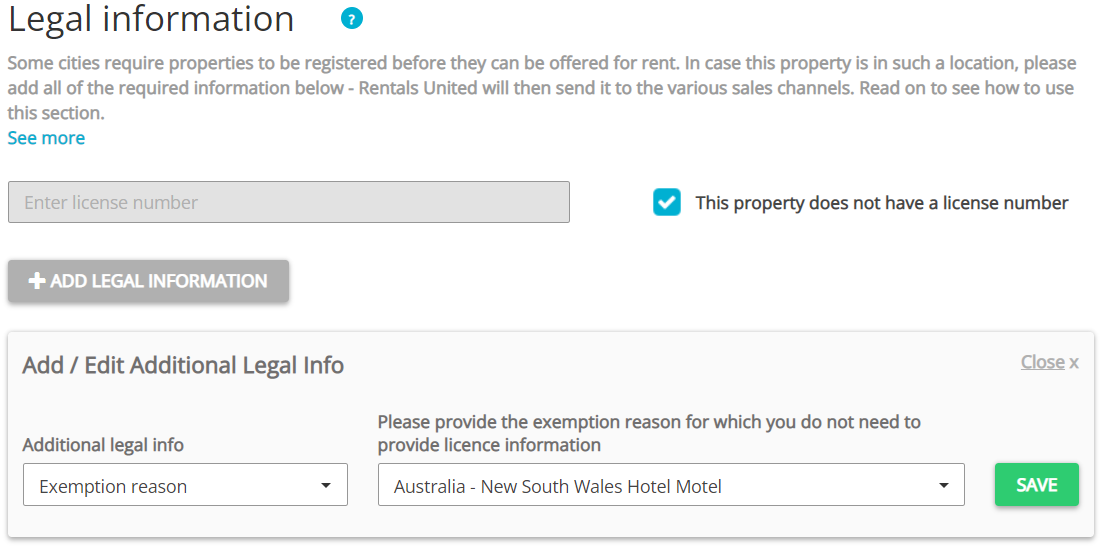
- If you are not exempt, follow the general rule here.
-
If you are exempt from licensing:
- Check This property does not have a licence number.
- Click Add legal information.
- Then, from Additional legal info dropdown, select the Exemption reason option.
- Select Hotel or motel.
- Click Save.
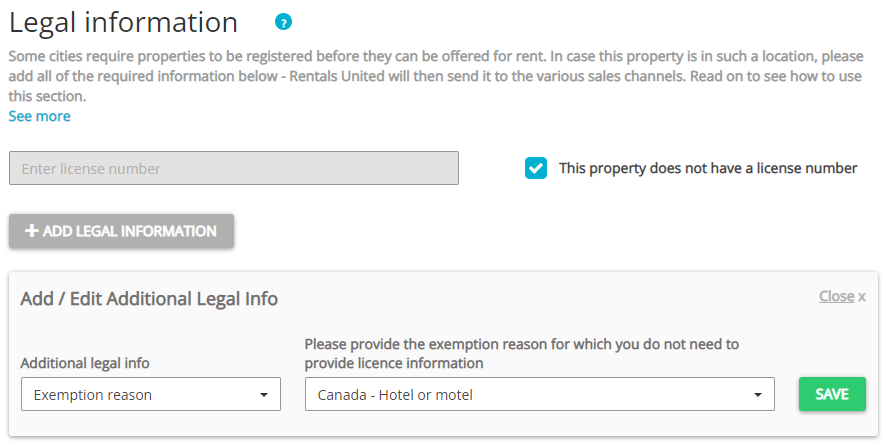
- If you are not exempt, follow the general rule here.
-
If you are exempt from licensing:
- Check This property does not have a licence number.
- Click Add legal information.
- Then, from Additional legal info dropdown, select the Exemption reason option.
- Select one of the following reasons:
- Canada - Event space
- Hotel or motel
- Canada - Location exempt
-
Click Save.
- If you are not exempt, follow the general rule here.
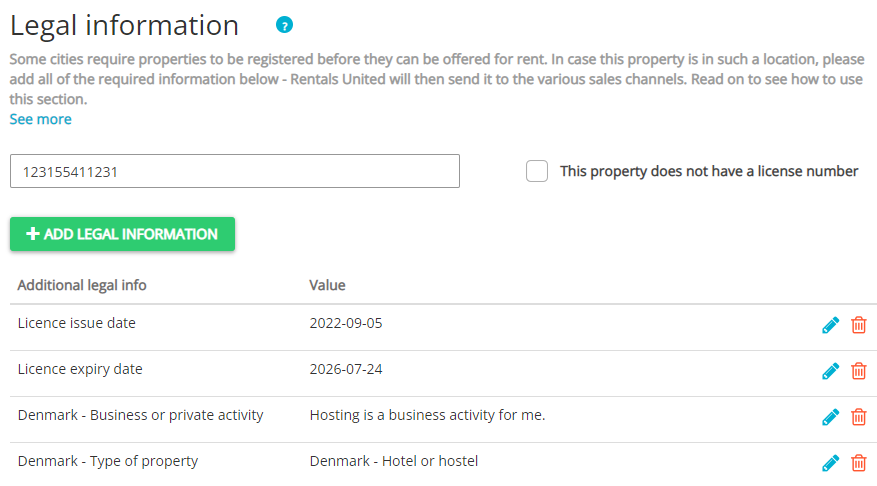
In Denmark, it is always required to provide a licence. Also, you need to provide additional information in this location that describes your business and property more.
- Provide Licence number in the text box.
- Click Add legal information.
- From Additional legal info dropdown, provide all the following:
- Licence issue date.
- Licence expiry date.
- Denmark - Business or private to indicate whether your activity is business-related or private.
- Denmark - Type of property to indicate the property type according to the local law.
- Fill in the Company profile.
-
Click Save.
The following information should be provided in the majority of regions in France (but not all). If the channel does not accept your property, check the local requirements and proceed accordingly. If it does not help, contact the Rentals United Support Team.
- If you are exempt from licensing, follow the general rule here.
-
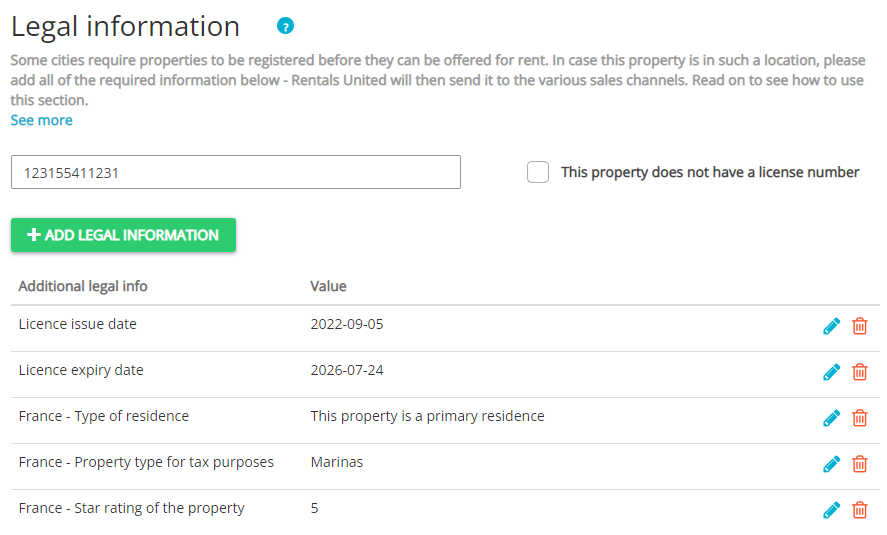
If you are not exempt:
- Provide Licence number in the text box.
- Click Add legal information.
- Then, from Additional legal info dropdown, provide all the following:
- France - Type of residence
- France - Property type for tax purposes(mandatory for tax categorization only)
- France - Star rating of the property(mandatory for tax categorization only)
- France - Revenue declaration as professional for direct tax purposes (see article 155 IV du CGI)
- Registration at Registre du Commerce et des Societes
- VAT Registration
- Click Save.
-
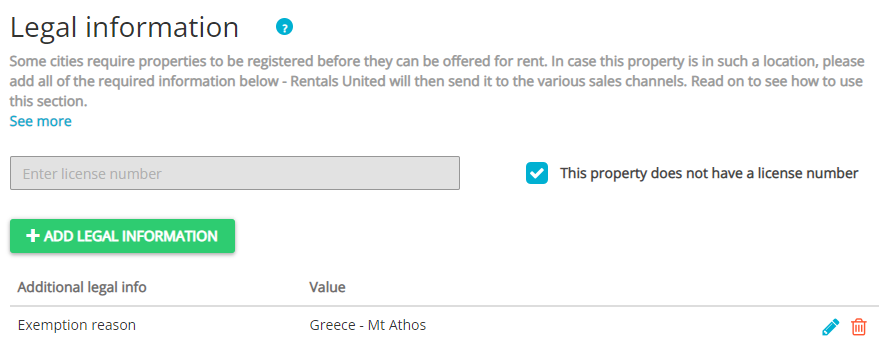
If you are exempt from licensing:
- Check This property does not have a licence number.
- Click Add legal information.
- Then, from Additional legal info dropdown, select the Exemption reason option.
- Select one of the following reasons:
- Greece - Boat
- Greece - Leasing
- Greece - Mt Athos
- Greece - Public state property
- Greece - Right habitation
- Greece - Trailer Mobile Home
- Click Save.
-
If you are not exempt:
-
Provide Licence number in the text box.
Tip: Licence format
- EOT number - includes only digits
- Short Term Lease Register number - 16 characters, letter K is present, other letters may appear
- Click Add legal information button.
- Provide the following:
- Licence issue date
- Licence expiry date
-
-
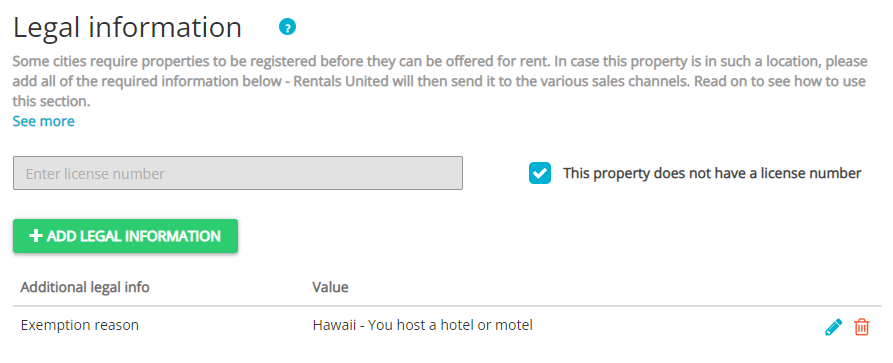
If you are exempt from licensing:
- Check This property does not have a licence number.
- Click Add legal information.
- Then, from Additional legal info dropdown, select the Exemption reason option.
- Select Hotel or motel.
- Click Save.
-
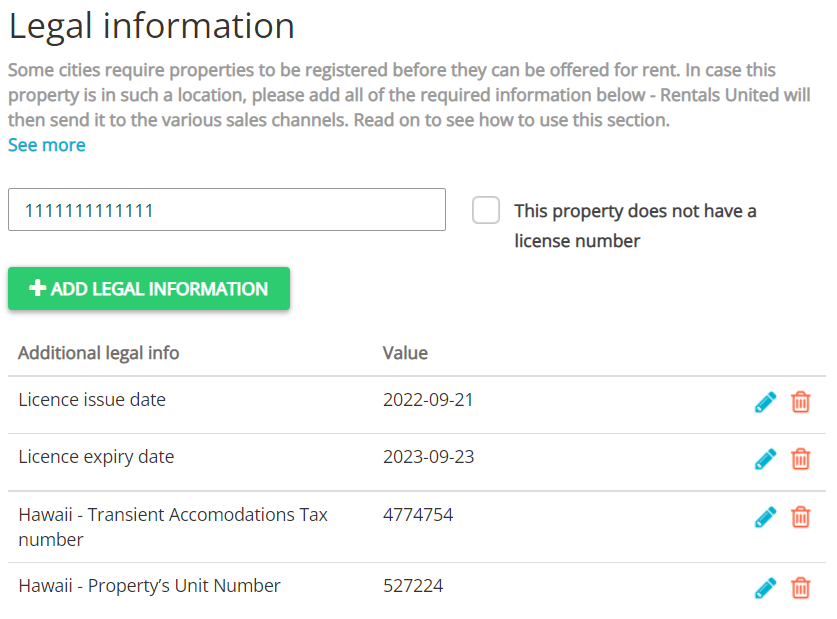
If you are not exempt:
- Provide Licence number in the text box.
- Click Add legal information.
- Provide the following:
- Hawaii - Property's unit number
- Hawaii - Transient Accommodations Tax number
- Click Save.
-
If you are not exempt:
- Click Add legal information button.
- From Additional legal info dropdown, select Italy - National Identification Number (CIN) and provide the National Identification Number.
- Certain regions may additionally require Regional Identification Number (CIR). In this case, provide it in the Licence number text box.
- Click Save.
-
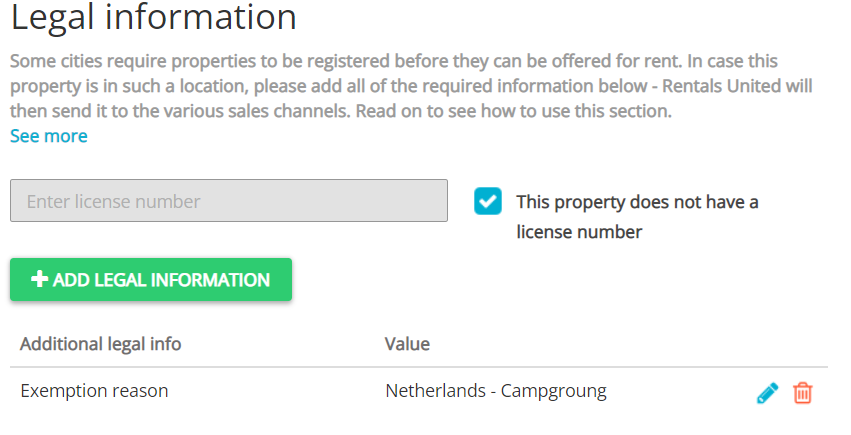
If you are exempt from licensing:
- Check This property does not have a licence number.
- Click Add legal information.
- Then, from Additional legal info dropdown, select the Exemption reason option.
- Select one of the following options:
- Netherlands - Campground
- Hotel or motel
- Netherlands - Nonresidential apartment.
- Click Save.
- If you are not exempt, follow the general rule here.
-
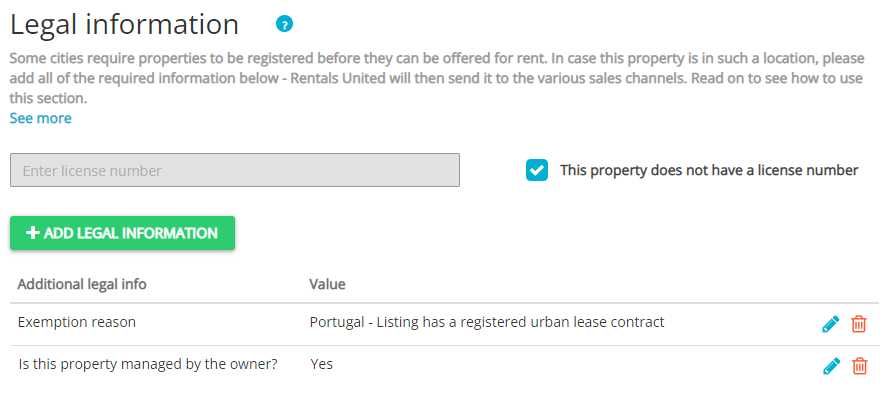
If you are exempt from licensing:
- Check This property does not have a licence number.
- Click Add legal information.
- From Additional legal info dropdown, select the Exemption reason option.
- Select one of the following reasons:
- Portugal - Listing has a registered urban lease contract
- Portugal - Listing is not a full building
- From Additional legal info dropdown, provide Is this property managed by the owner? information.
- Provide the following:
- Email (Company profile)
- Company name (Company profile)
- VAT number (Company profile)
- Click Save.
-
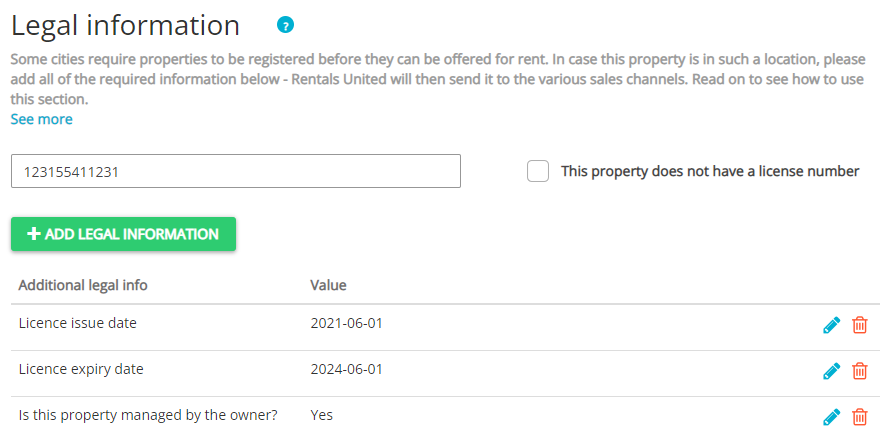
If you are not exempt:
- Provide Licence number in the text box.
- Click Add legal information.
- From Additional legal info dropdown, provide the Is this property managed by the owner? information.
- Provide the following:
- Email (Company profile)
- Company name (Company profile)
- VAT number (Company profile)
- Click Save.
For properties located in Spain, you must provide the obligatory information described below and regional requirements.
- Provide information on tax degree.
-
From Additional legal info dropdown, select Spain - Is tax degree applicable?. Set it to Yes.
Note: If the tax degree is not applicable, set Spain - Is tax degree applicable? to No and jump to Step 2. - Provide the following information:
- Spain - Block
- Spain - Complementary information
- Spain - Door
- Spain - Floor
- Spain - Gate
- Spain - House number
- Spain - Municipal code
- Spain - Number type
- Spain - Number qualifier
- Spain - Staircase
- Spain - Street name
- Spain - Street type
- Spain - Province code
-
- Provide information on the property owner
- From Additional legal info dropdown, select Is this property managed by the owner?.
- If the property is managed by the owner, set it to Yes.
- If the property is not managed by the owner, set it to No.
- If you selected No in the previous step, select Owner info from the Additional legal info dropdown and provide the following information:
- Mailing address
- Name
- Phone
- Citizenship
- Depending on whether you have a Spanish identification number:
- If you have the Spanish identification number - set Does owner have Spanish identification number? to Yes. Then provide you identification number in the Spanish identification number dropdown.
- If you do not have the Spanish identification number - set Does owner have Spanish identification number? to No. Then, select identification document from the Identification type dropdown and provide the document's number in the Non-Spanish identification number dropdown
- From Additional legal info dropdown, select Is this property managed by the owner?.
- Provide information on the cadastral number
- From Additional legal info dropdown, select Spain - Cadastral number and provide the number.
-
From Additional legal info dropdown, select Spain - Cadastral type option and select on of the following types:
- Spain
- Pais Vasco
- Navarra
Note: If you do not have cadastral number - from Additional legal info dropdown, select Spain - Cadastral type option and select No cadastral reference.
- Click Save.
If you have licence:
- Provide the Regional Licence in the Licence number field.
- Click Add legal information.
- Provide the National Licence in Spain - National Registration Number or Spain - National Registration Number (Longstay).
- Click Save.
If you are exempt from National Licence
- Check This property does not have a licence number.
- Click Add legal information. Then, from Additional legal info dropdown, select the Exemption reason option.
- Select one of the following reasons:
- Hotel
- Hotel complex
- Serviced apartment
- Motel
- Hostel
- Tourist camp
- Rural house
- Click Save.
If you are exempt from Regional Licence
- Check This property does not have a licence number.
- Click Add legal information. Then, from Additional legal info dropdown, select the Exemption reason option.
- Select one of the following reasons:
- Temporary listing
- Click Save.
If you have licence:
- Provide the Regional Licence in the Licence number field.
- Click Add legal information.
- Provide the National Licence in Spain - National Registration Number or Spain - National Registration Number (Longstay).
- Click Save.
If you are exempt from National Licence
- Check This property does not have a licence number.
- Click Add legal information. Then, from Additional legal info dropdown, select the Exemption reason option.
- Select one of the following reasons:
- Hotel
- Hotel complex
- Serviced apartment
- Motel
- Hostel
- Click Save.
If you are exempt from Regional Licence
- Check This property does not have a licence number.
- Click Add legal information. Then, from Additional legal info dropdown, select the Exemption reason option.
- Select one of the following reasons:
- Temporary listing
- Click Save.
If you have licence:
- Provide the Regional Licence in Licence number field.
- Click Add legal information.
- Provide the National Licence in the Spain - National Registration Number or Spain - National Registration Number (Longstay).
- Click Save.
If you are exempt from National Licence
- Check This property does not have a licence number.
- Click Add legal information. Then, from Additional legal info dropdown, select the Exemption reason option.
- Select one of the following reasons:
- Hotel
- Hotel complex
- Serviced apartment
- Motel
- Hostel
- Ruraltourism
- Click Save.
If you are exempt from Regional Licence
- Check This property does not have a licence number.
- Click Add legal information. Then, from Additional legal info dropdown, select the Exemption reason option.
- Select one of the following reasons:
- Temporary listing
- Click Save.
If you have licence:
- Provide the Regional Licence in the Licence number field.
- Click Add legal information.
- Provide the National Licence in Spain - National Registration Number or Spain - National Registration Number (Longstay).
- Click Save.
If you are exempt from National Licence
- Check This property does not have a licence number.
- Click Add legal information. Then, from Additional legal info dropdown, select the Exemption reason option.
- Select one of the following reasons:
- Hotel
- Hotel complex
- Serviced apartment
- Motel
- Hostel
- Ruraltourism
- Agrotourism
- Click Save.
If you are exempt from Regional Licence
- Check This property does not have a licence number.
- Click Add legal information. Then, from Additional legal info dropdown, select the Exemption reason option.
- Select one of the following reasons:
- Temporary listing
- Click Save.
If you have licence:
- Provide the Regional Licence in the Licence number field.
- Click Add legal information.
- Provide the National Licence in Spain - National Registration Number or Spain - National Registration Number (Longstay).
- Click Save.
If you are exempt from National Licence
- Check This property does not have a licence number.
- Click Add legal information. Then, from Additional legal info dropdown, select the Exemption reason option.
- Select one of the following reasons:
- Hotel
- Hotel complex
- Serviced apartment
- Motel
- Hostel
- Villa
- Emblematic house
- Rural house
- Click Save.
If you are exempt from Regional Licence
- Check This property does not have a licence number.
- Click Add legal information. Then, from Additional legal info dropdown, select the Exemption reason option.
- Select one of the following reasons:
- Ruraltourism
- Temporary listing
- Click Save.
If you have licence:
- Provide the Regional Licence in the Licence number field.
- Click Add legal information.
- Provide the National Licence in Spain - National Registration Number or Spain - National Registration Number (Longstay).
- Click Save.
If you are exempt from National Licence
- Check This property does not have a licence number.
- Click Add legal information. Then, from Additional legal info dropdown, select the Exemption reason option.
- Select one of the following reasons:
- Hotel
- Hotel complex
- Serviced apartment
- Motel
- Hostel
- Tourist camp
- Rural house
- Ruraltourism
- Agrotourism
- Click Save.
If you are exempt from Regional Licence
- Check This property does not have a licence number.
- Click Add legal information. Then, from Additional legal info dropdown, select the Exemption reason option.
- Select one of the following reasons:
- Hotel
- Camp
- Tourist camp
- Serviced apartment
- Ruraltourism
- Detached house
- Rural house
- Temporary listing
- Click Save.
If you have licence:
- Provide the Regional Licence in the Licence number field.
- Click Add legal information.
- Provide the National Licence in Spain - National Registration Number or Spain - National Registration Number (Longstay).
- Click Save.
If you are exempt from National Licence
- Check This property does not have a licence number.
- Click Add legal information. Then, from Additional legal info dropdown, select the Exemption reason option.
- Select one of the following reasons:
- Hotel
- Hotel complex
- Serviced apartment
- Motel
- Hostel
- Click Save.
If you are exempt from Regional Licence
- Check This property does not have a licence number.
- Click Add legal information. Then, from Additional legal info dropdown, select the Exemption reason option.
- Select one of the following reasons:
- Hotel
- Camp
- Tourist camp
- Serviced apartment
- Ruraltourism
- Detached house
- Rural house
- Temporary listing
- Click Save.
-
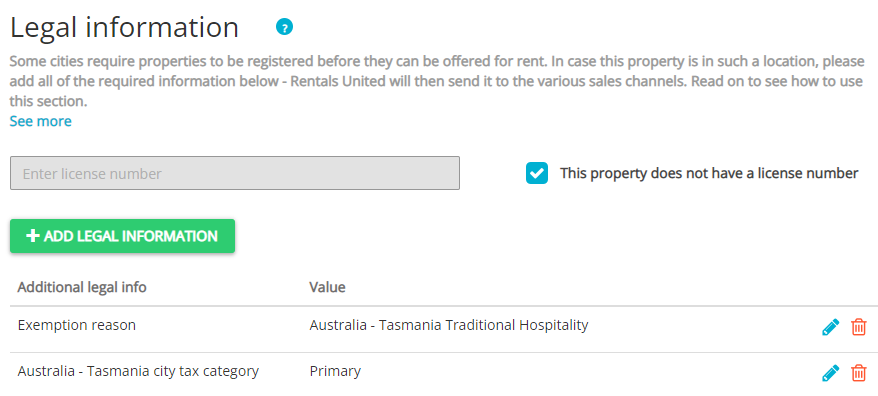
If you are exempt from licensing:
- Check This property does not have a licence number.
- Click Add legal information.
- From Additional legal info dropdown, select the Exemption reason option.
- Select one of the following reasons:
- Australia, Tasmania - Home sharing
- Australia, Tasmania - Land use
- Australia, Tasmania - Traditional hospitality
- From Additional legal info dropdown, provide Australia, Tasmania - City tax category information.
- Provide the following:
- Email (Company profile)
- Company name (Company profile)
- Step 1: Basic info: Address.
- Click Save.
-
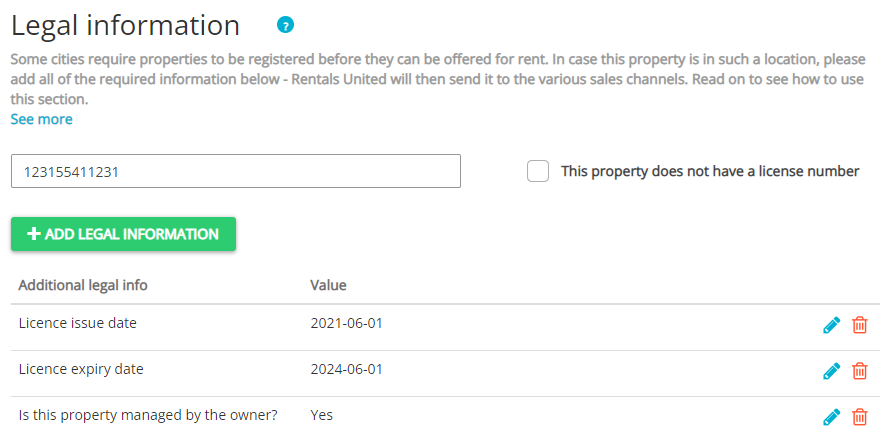
If you are not exempt:
- Provide Licence number in the text box.
- Click Add legal information.
- From Additional legal info dropdown, provide the Australia, Tasmania - City tax category information.
- Provide the following:
- Email (Company profile)
- Company name (Company profile)
- Step 1: Basic info: Address
- Click Save.
- if you are not exempt:
- Provide Licence number in the text box.
- Click Add legal information.
- Provide UK - Energy Rating. The possible categories are from A to G.
- if you are exempt:
- Check This property does not have a licence number.
- Click Add legal information.
- Provide UK - Energy Rating. The possible categories are from A to G.
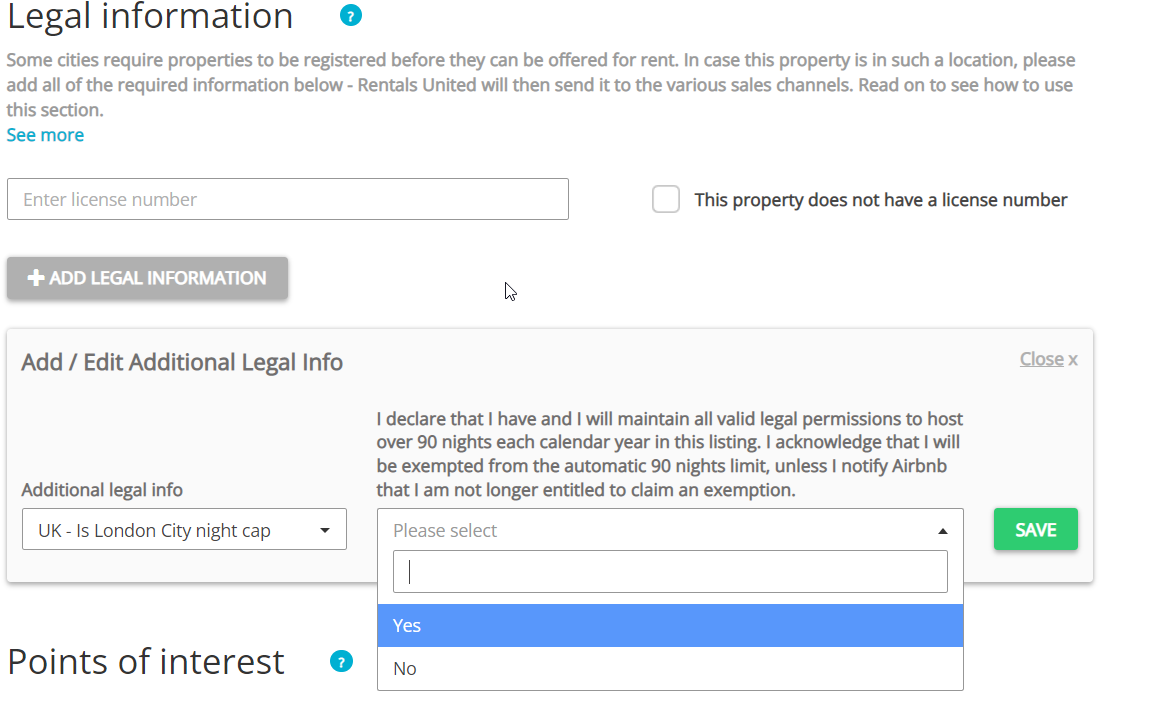
Licence in London is always required. By default, hosts in London can rent their property for up to 90 nights in a year. If you want to rent more nights, you need to provide additional information in this location.
- Provide Licence number in the text box.
- Click Add legal information.
- From Additional legal info dropdown, select UK - Is London city night cap consented.
- Select one of the options:
- Yes - if you want to rent your property for more than 90 nights in a year
- No - if you want Airbnb to block possibility to rent bookings if you exceed 90 nights blocked in a year
- Click Save.
You need to provide additional information in this location. Regardless if you have a licence or are exempt, always provide the company name (Company profile).
-
If you are not exempt:
- Provide Licence number in the text box.
- Click Add legal information.
- Provide Licence expiry date.
- Click Save.
-
If you are exempt from licensing:
- Check This property does not have a licence number.
- Click Add legal information.
- From Additional legal info dropdown, select the Exemption reason option.
- Select one of the following reasons:
- Hotel or motel
- Bed and breakfast
- Click Save.
- Provide Step 1: Basic info: Address.
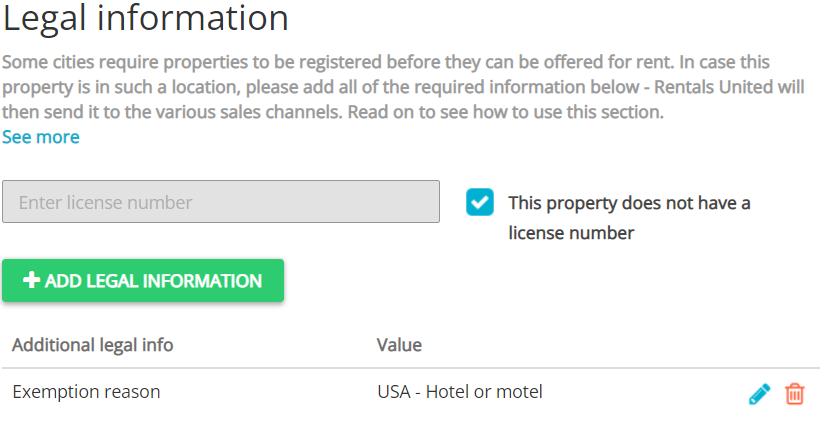
If you are not exempt, provide your Business Tax Receipt (BTR) number in the Licence number text box.
If you are exempt from licensing, check This property does not have a licence number.
-
If you are not exempt:
- Provide your Business Tax Receipt (BTR) number in the Licence number text box.
- Click Add legal information.
- From Additional legal info dropdown, provide the USA - Tourist Development Tax (TDT) information.
- Click Save.
- Provide Company name (Company profile).
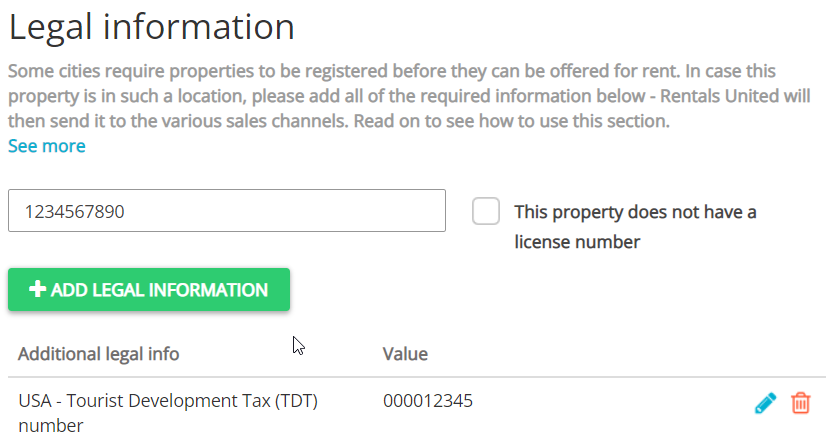
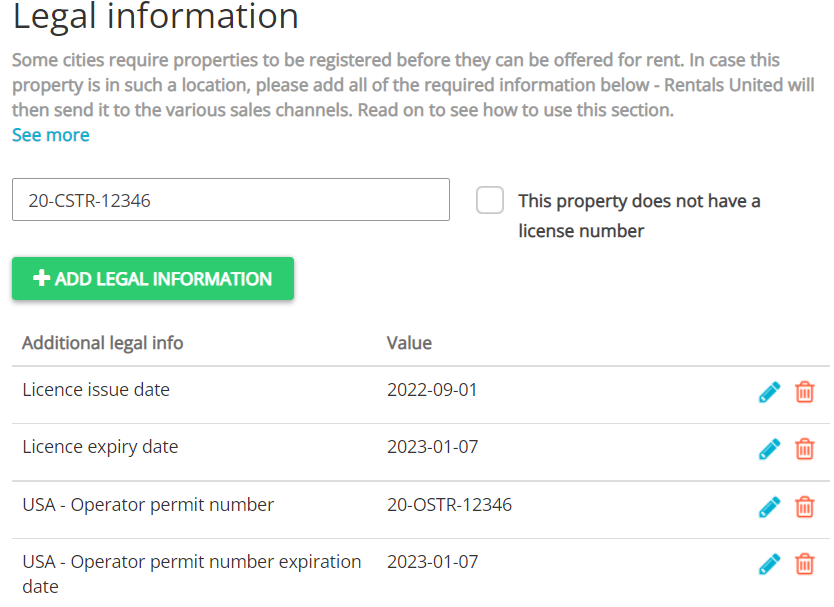
You need to provide additional information in this location. If you have a licence, always provide the Company name (Company profile).
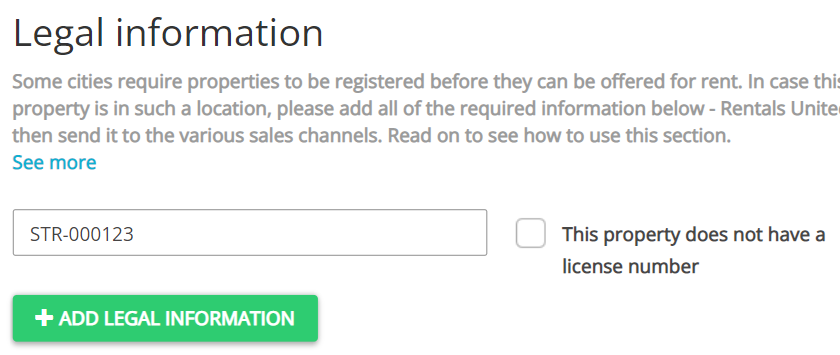
- If you are exempt from licensing, check This property does not have a licence number.
-
If you are not exempt:
- Provide your STR registration number in the Licence number text box.
- Click Add legal information.
- From Additional legal info dropdown, provide the following information:
- Licence expiry date.
- USA - Operator permit number
- USA - Operator permit number expiration date
- Click Save.
-
If you are exempt from licensing:
- Check This property does not have a licence number.
- Click Add legal information.
- From Additional legal info dropdown, select the Exemption reason option.
- Select one of the following reasons:
- Hotel or motel
- USA, Boston - Hospitals
- Hotel or motel
- USA, Boston - Institutional Business
- Click Save.
- Provide Step 1: Basic info: Address.
-
If you are not exempt:
- Provide your Department of Revenue (DOR) number in the Licence number text box.
- Click Add legal information.
- From Additional legal info dropdown, provide the following:
- USA, Boston - STR licence number
- USA - Massachusetts tax collection type.
- Click Save.
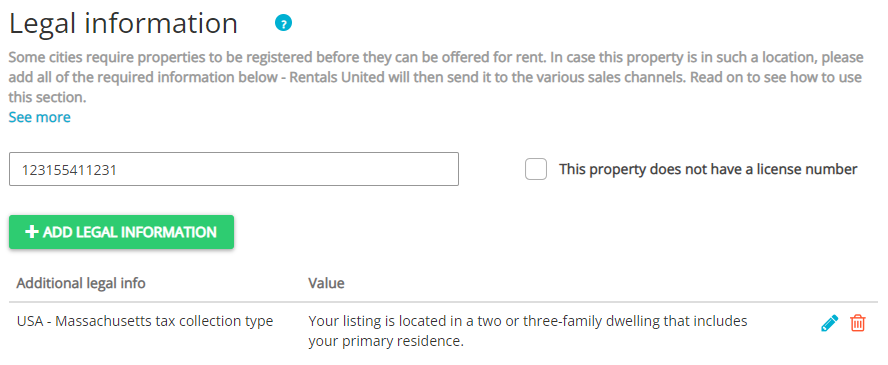
In Massachusetts, it is always required to provide a licence. You need to provide additional information in this location to better describe your property.
- Provide Licence number in the text box.
- Click Add legal information.
- From Additional legal info dropdown, provide the USA - Massachusetts tax collection type information.
- Click Save.
- If you are exempt from licensing, check This property does not have a licence number.
-
If you are not exempt:
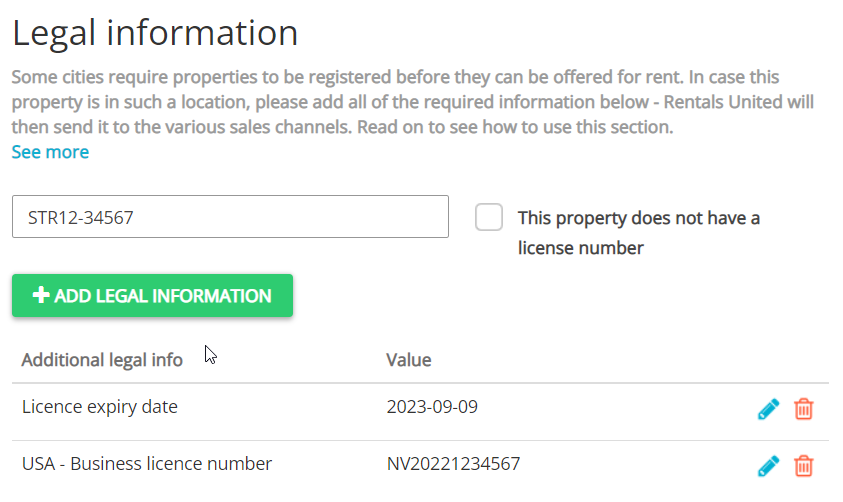
- Provide Licence number in the text box.
- Click Add legal information.
- From Additional legal info dropdown, provide the following information:
- Licence expiry date
- USA - Business licence number
- Click Save.
-
If you are exempt from licensing:
- Check This property does not have a licence number.
- Click Add legal information.
- From Additional legal info dropdown, select the Exemption reason option.
- Select one of the following options:
- Hotel or motel
- Bed and breakfast
- Click Save.
-
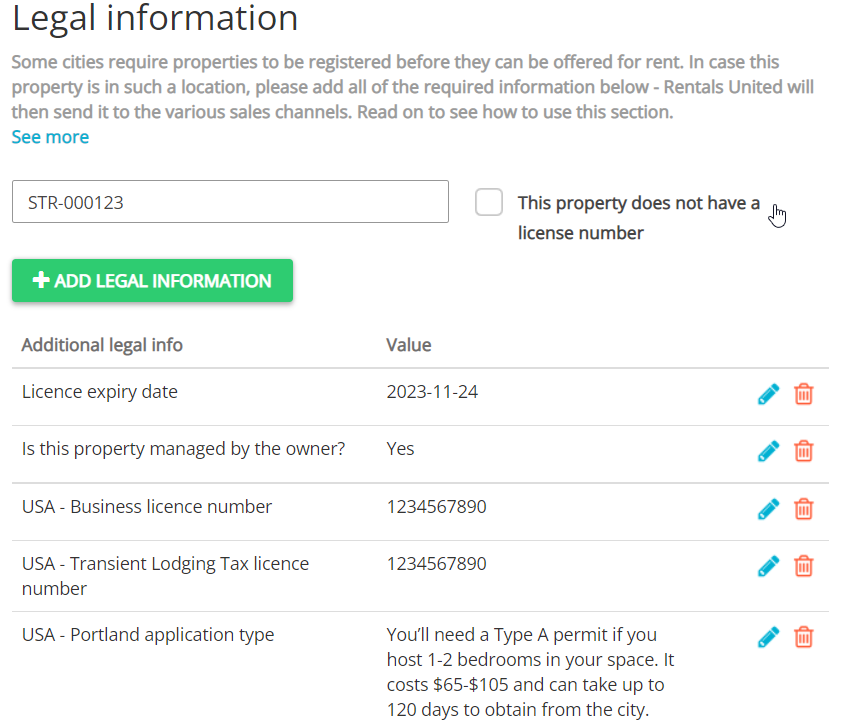
If you are not exempt and you're the owner of the property:
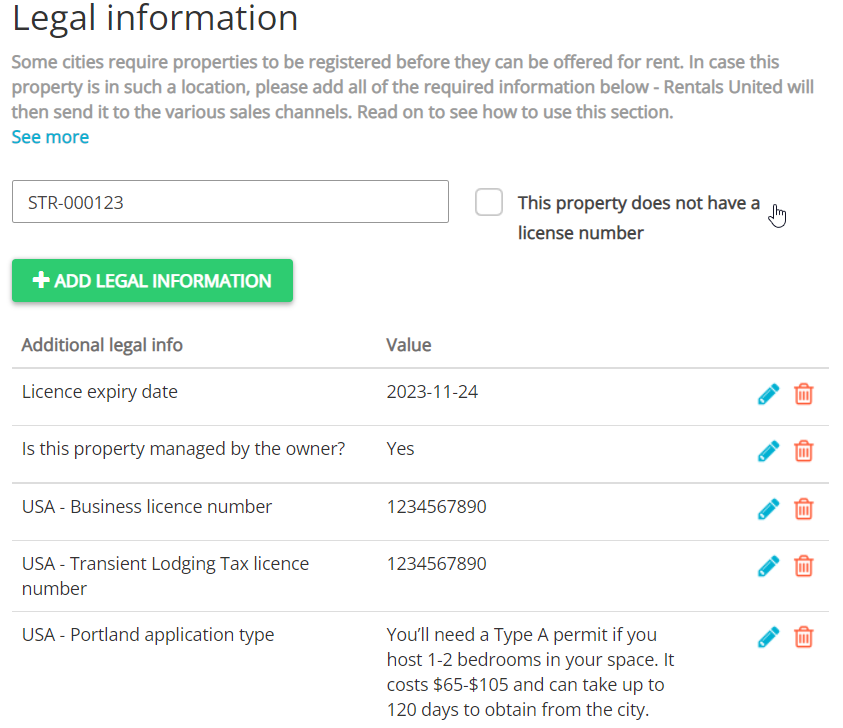
- Provide Licence number in the text box.
- Click Add legal information.
- From Additional legal info dropdown, provide the following information:
- Put Licence expiry date
- Provide USA - Business licence number
- Provide USA - Transient Lodging Tax licence number
- Provide USA - Portland application type
- Set Is this property managed by the owner? to Yes
- Select Owner and provide required information: Owner email, Owner mailing address, Owner name, Owner phone.
- Fill in the Company profile:
- Company name
- Phone number
- Address
- Click Save.
-
If you are not exempt and you're not the owner of the property
- Provide Licence number in the text box.
- Then, from Additional legal info dropdown, provide the following:
- Put Licence expiry date
- Provide USA - Business licence number
- Provide USA - Transient Lodging Tax licence number
- Choose your USA - Portland application type
- Set Is this property managed by the owner to Noy - sorry, this flow is not supported yet.
- Fill in the Company profile:
- Company name
- Phone number
- Address
- Click Save.
- If you are exempt from licensing, check This property does not have a licence number.
-
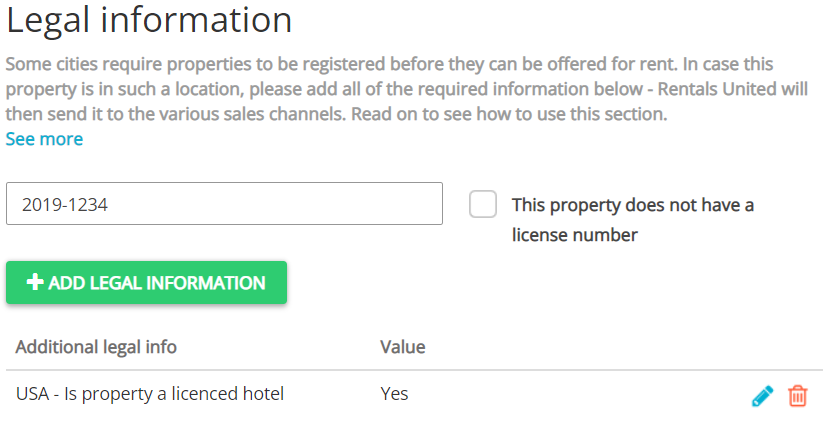
If you require a hotel / motel / inn / b&b licence
- Provide Licence number in the text box.
- Click Add legal information.
- From Additional legal info dropdown, select USA - Is property a licensed hotel and choose Yes.
- Click Save.
-
If you do not require a hotel / motel / inn / b&b licence
- Provide Licence number in the text box.
- Provide email (Company profile).
- Provide company name (Company profile).
-
If you are exempt from licensing:
Check This property does not have a licence number.
- Click Add legal information.
- From Additional legal info dropdown, select the Exemption reason option.
-
Select one of the following reasons:
- Hotel or motel
- Bed and breakfast
- Click Save.
- Provide company name (Company profile).
- Provide company email (Company profile).
-
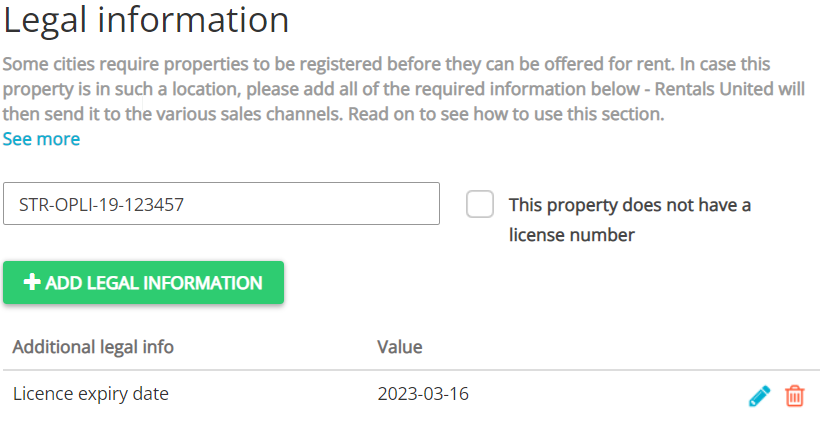
If you are not exempt:
- Provide Licence number in the text box.
- Click Add legal information.
- From Additional legal info dropdown, provide Licence expiry date.
- Click Save.
- Provide company name (Company profile).
- Provide company email (Company profile).
-
If you are exempt from licensing:
- Check This property does not have a licence number.
- Click Add legal information.
- From Additional legal info dropdown, select the Exemption reason option.
- Select one of the following reasons:
- Hotel or motel
- Bed and breakfast
- Click Save.
There are two types of licences possible to provide in this location. Depending on its type, you should provide different information.
- If you have an Unhosted (VR) licence only, provide it in the Licence number text box.
-
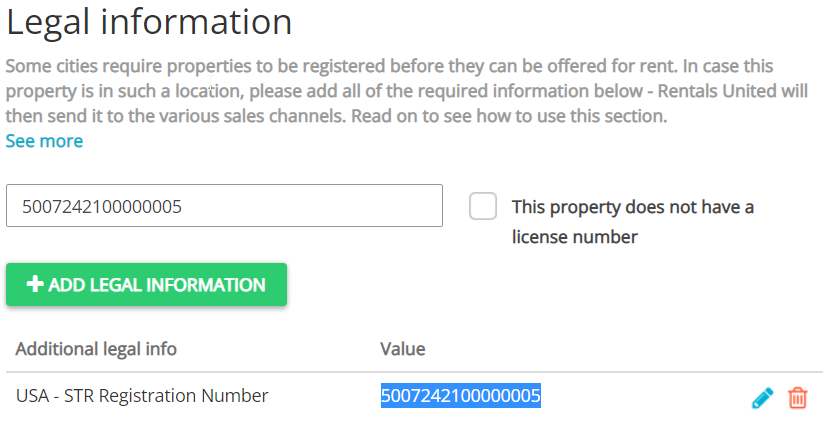
If you have a Hosted (STR) licence only:
- Provide Hosted (STR) licence number in the Licence number text box.
- Click Add legal information button.
- Select USA - STR registration Number from the dropdown and provide Hosted (STR) licence number in it.
- Click Save.
- If you have both Unhosted (VR) and Hosted (STR) licences:
- Provide Unhosted (VR) licence number in the Licence number text box.
- Click Add legal information button.
- Select USA - STR registration Number from the dropdown and provide Hosted (STR) licence number.
- Click Save.