In the Step 2: Amenities section, all the necessary information about the property and its layout can be specified. It is possible to adjust the number of rooms, their type and any other information that is relevant, including rules for the future guests and amenities.
After being reviewed, amenities are mapped between Rentals United and the Sales Channel. However, please note that not all of them can be successfully mapped, as they appear variously for Rentals United and Sales Channel. In order to learn the details of the mapped amenities, it is possible to request a full summary of mappings. In order to do that, contact the Rentals United Support Team.
Number of bedrooms

Number of bedrooms refers to the overall number of rooms intended to sleep.
|
|
Number of bathrooms
Number of bathrooms refers to the overall number of bathing rooms with a shower or a bath.
The number of bathrooms in Airbnb is set based on the following settings in Rentals United:
-
Number of bathrooms (e.g. 1)
-
Number of toilets (e.g. 1)
-
Number of 'En suite bathroom' (409) amenities (e.g. 1)
In the above case, the number of bathrooms in Airbnb will be set to 3.
'En suite bathroom' amenities and bathrooms
-
Bathrooms > 'En suite bathrooms' - all en suite bathrooms will be sent along with the remaining bathrooms, but not exceeding the maximum number of bathrooms allowed e.g. Bathrooms = 7, 'En suite bathrooms' = 5 in Rentals United will be set in Airbnb as Bathrooms = 2, 'En suite bathrooms' = 5.
-
Bathrooms = 'En suite bathrooms' - only en suite bathrooms will be sent e.g. Bathrooms = 5, 'En suite bathrooms' = 5 in Rentals United will be set in Airbnb as Bathrooms = 0, 'En suite bathrooms' = 5.
-
Bathrooms < 'En suite bathrooms' - all en suite bathrooms and all bathrooms will be sent e.g. Bathrooms = 3, 'En suite bathrooms' = 5 in Rentals United will be set in Airbnb as Bathrooms = 3, 'En suite bathrooms' = 5.
0 bathrooms at the property
|
|
Number of toilets
Number of toilets refers to the overall number of WCs.
|
|
Kitchen
Kitchen refers to the separated kitchen area within the property. If you tick the separate kitchen checkbox, then a kitchen room type will be created at your property. In Rentals United it is treated as a room type.
Kitchen information can be provided to Airbnb in various ways:
-
by selecting the separate kitchen checkbox
-
by creating a kitchen room that creates kitchen in Airbnb, see Amenities distribution across rooms
-
by selecting kitchen amenities that will be displayed in Airbnb and Rentals United, see Step 2: Amenities
|
|
Bed types
After being reviewed, bed types are mapped between Rentals United and Airbnb. Check what beds you specified to be available at your property and how they are displayed in Airbnb.
| RU ID | Rentals United | Airbnb ID |
|---|---|---|
| 55 | Baby bed | single_bed |
| 384 | Bunk beds (sgl on top, dbl on bottom) | bunk_bed |
| 444 | Bunk bed | bunk_bed |
| 61 | Double bed | double_bed |
| 200 | Double sofa bed | sofa_bed |
| 209 | Extra bed | single_bed |
| 324 | King size bed | king_bed |
| 1344 | Extra large double | king_bed |
| 778 | Murphy bed | single_bed |
| 440 | Pair of twin beds | 2 x single_bed |
| 1347 | Large double | queen_bed |
| 485 | Queen size bed | queen_bed |
| 779 | Rollaway beds | single_bed |
| 939 | French bed | single_bed |
| 323 | Single bed | single_bed |
| 237 | Sofabed | sofa_bed |
| 515 | Wallbed | single_bed |
| 1346 | Futon mat | floor_mattress_bed |
| 1825 | Double futon | 2x floor_mattress_bed |
|
|
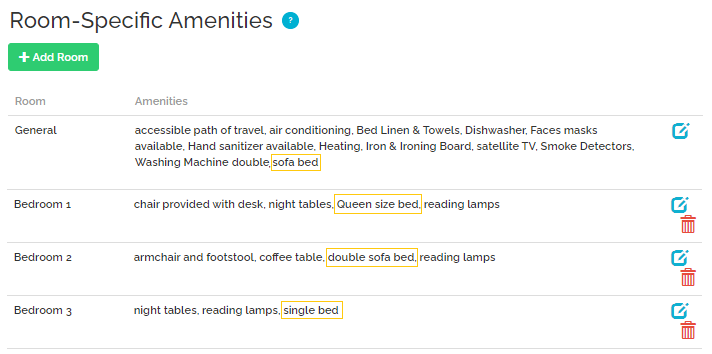
Bedding composition
Airbnb accepts beds distributed across rooms. Note that there might be slight differences, depending on your set-up in Rentals United.
-
If there are beds in rooms only, Rentals United will attempt to reflect this set-up in Airbnb.
-
If there are beds in rooms, Rentals United will inform Airbnb about how beds are distributed within rooms.
-
If there are beds in the general lane, they will be placed under the living room in Airbnb.
-
If there are beds in general only, Rentals United attempts to redistribute beds to rooms one bed per room. It usually requires that the number of beds is equal to Maximum number of guests. Check Bed types.
|
|
Amenities distribution across rooms

Amenities distribution across rooms refers to the way amenities are placed across the rooms. This gives a better understanding of what devices, appliances and amenities can be found in each room.
If you have an 'En suite bathroom' (409) as a room-specific amenity, Airbnb will count each amenity as an individual bathroom.
Other mapped amenities will be shared with Rentals United with no information on their placement across rooms.
Depending on what rooms you have in Rentals United, the following types of rooms are created in Airbnb.
| Rentals United | RU ID | Airbnb |
|---|---|---|
| Bathroom | 81 | full_bathroom |
| Bedroom | 257 | bedroom |
| Bedroom / Living room | 372 | living_room |
| Kitchen | 101 | kitchen |
| Kitchen in the living / dining room | 94 | living_room |
| Living room | 249 | living_room |
| WC | 53 | half_bathroom |
|
|
Other amenities-related information
Note: House rules
You may be particularly interested in how some of the amenities work. Some amenities are synchronized directly to the House rules section in Airbnb . These include:
-
children policy
-
pet amenities
-
smoking amenities
-
parties
Children policy
If you do not allow children at your property, make sure to select at least one of these amenities. If you do not, Airbnb show your listing as children-friendly. This is synchronized directly to the House rules section in Airbnb.
-
No children under 4 (857)
-
No children under 6 (870)
-
No children under 12 (858)
-
Children not allowed (942)
Pet amenities
Pets amenities are synchronised with Airbnb. Follow the rules below to make sure your pet policies are synchronised as intended. Most of them are synchronized directly to the House rules section in Airbnb.
If you accept pets, use the Pets are welcome (595) amenity. If you require an extra charge for bringing a pet to your property, you can add the Pets paid (238) amenity. Remember to add a proper note on this extra charge to Step 3: Description or an optional pet fee in Step 5: Price and availability. Read more how the pet fee is synchronised to Airbnb here: General rules for fees in v3.
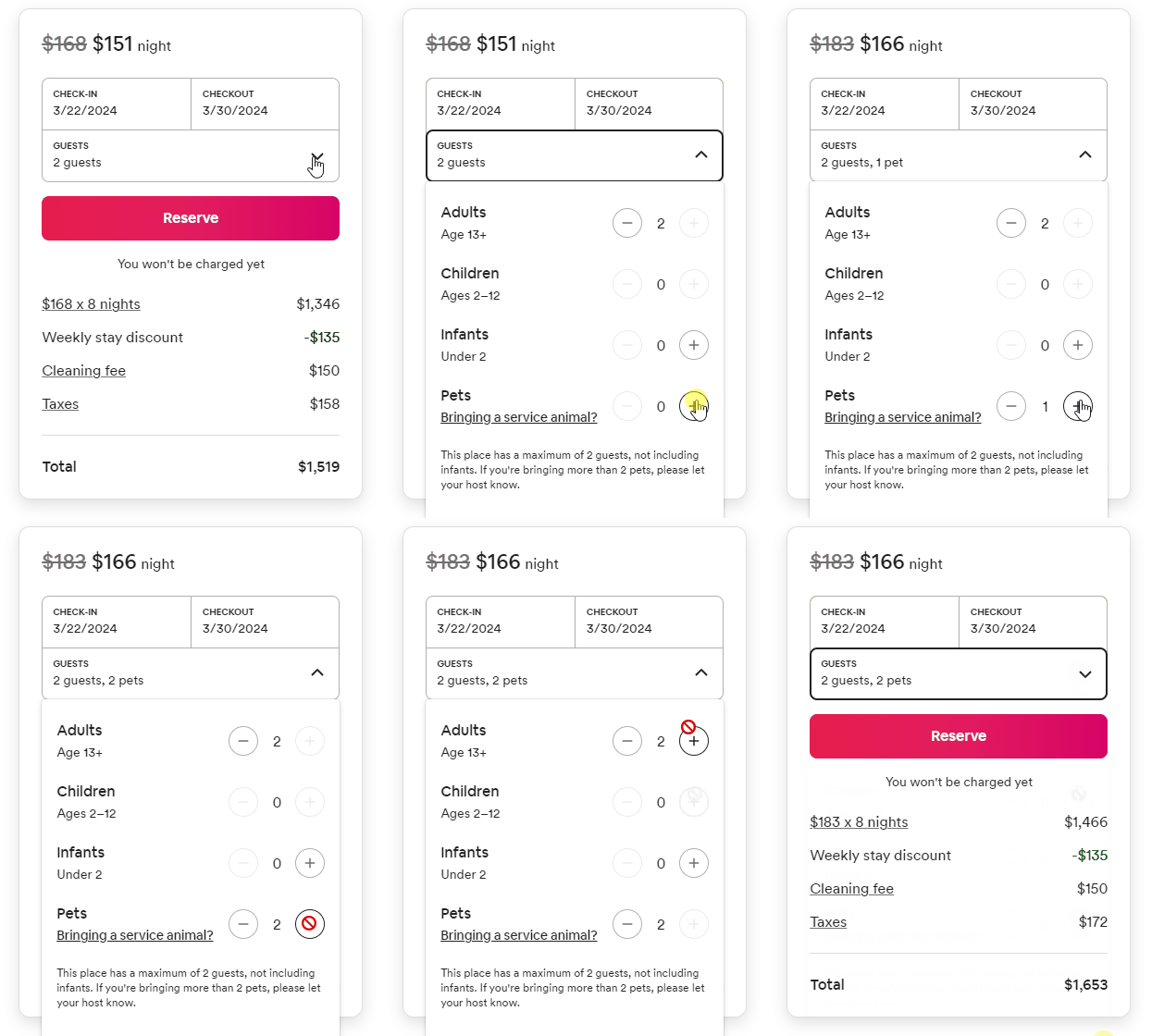
If you choose any of these amenities, Airbnb will by default set the maximum number of accepted pets to 5. You can change the maximum number of pets by choosing one of the pets capacity amenities listed below.
-
max 1 pet allowed (1873)
-
max 2 pets allowed (1874)
-
max 3 pets allowed (1875)
-
max 4 pets allowed (1876)
-
max 5 pets allowed (1877)
In order to be properly synchronised, the capacity amenities require at least one amenity to be present: Pets are welcome (595) or Pets paid (238).
Depending on the number of maximum pets allowed, the guest will be able to add a specific number of pets (up to a maximum specified number) - as shown on the screenshot.
If you do not accept pets use the No pets allowed (733) amenity.
Smoking amenities
If you select none of the below amenities, we will send to Airbnb information that you do not accept smoking. Choose one of these amenities to let your guest know that they are allowed to smoke and where:
-
Designated smoking area (ID: 1002)
-
Smoking allowed (ID: 802)
-
Smoking (ID: 799)
This is synchronized directly to the House rules section in Airbnb.
Parties
By default, we will set your property as not allowing parties. If you want to change this setting, select Parties allowed (ID: 1733). This is synchronized directly to the House rules section in Airbnb.
Check-in options
Now you can provide your guests with a detailed information on the check-in type - whether it is contactless or somebody meets your guests at the door. On the right, you can see how Airbnb will present them and additional text that will be displayed after the amenity is selected. Guests will receive this information before the check-in.
| RU ID | Rentals United | Airbnb | Airbnb text |
|---|---|---|---|
| 616 | Doorman | doorman_entry | Someone is available 24 hours a day to hand the keys. |
| 1818 | Lockboxes & Key Safes check-in | lockbox | Self-check-in. Guests need to enter a safety code to open the small storage where rental keys are stored. |
| 688 | Electronic door locks | smartlock | Self-check-in. The lock can be opened with a mobile app or keypad. |
| 1819 | Keypad check-in | keypad | Self-check-in. Guests can open the door with a code received from the host. |
| 1817 | In-person check-in | host_checkin | A host will meet guests to hand over the keys. |
| 1820 | Other check-in | other_checkin | Guests can use different methods to check in. Details will be provided before the check-in. |
Check-out tasks
Airbnb offers a feature to provide your guests with clear instructions on how to check out from your property. Guests expect an easy check-out without any cleaning responsibilities, but they can certainly do a few tasks - effortless for them, but making it all a lot easier for you. The great thing about the check-out tasks is that guests can read them before they book your property and Airbnb will automatically remind them about the tasks the night before the check-out. You can read more about this feature in this Airbnb article.
The check-out tasks in Airbnb are based on the amenity selection in Rentals United as per the table below.
| RU ID | Rentals United | Airbnb task type | Airbnb description |
|---|---|---|---|
| 1878 | Checkout task: Return keys on checking out | return_keys | Return keys to a specific place/person on checking out. |
| 1879 | Checkout task: Turn lights/appliances etc off on leaving | turn_things_off | Turn lights/appliances etc off on leaving. |
| 1880 | Checkout task: Take care of trash before leaving | throw_trash | Take care of trash before leaving. |
| 1881 | Checkout task: Lock the doors on leaving | lock_up | Lock the doors on leaving. |
| 1882 | Checkout task: Keep the towels in a specified place | gather_towels | Keep the towels in a specified place. |
| 1883 | Checkout task: Turn off lights and air conditioning | turn_things_off | Turn off the lights and air conditioning before leaving. |
| 1884 | Checkout task: Turn off fans and electronics | turn_things_off | Turn off fans and other electronics. |
| 1885 | Checkout task: Turn off lights and close windows | turn_things_off | Please turn off the lights, unplug electronics and close windows. |
| 1886 | Checkout task: Lock windows and doors | lock_up | Before leaving, please ensure all windows and doors are securely locked. |
| 1887 | Checkout task: Lock up and return key | lock_up | Lock up and return the key as instructed at check-in. |
| 1888 | Checkout task: Lock door and balcony and return key | lock_up | Lock the main door and any balcony doors before leaving. Please refer to the check-in instructions for key return. |
| 1889 | Checkout task: Gather towels and linens in linen bag | gather_towels | Please gather all used towels and linens and place them in the provided linen bag. |
| 1890 | Checkout task: Leave towels in the bathroom | gather_towels | Please leave your used towels in the bathrooms. |
| 1891 | Checkout task: Gather towels and linens | gather_towels | To ensure a smooth departure, please gather all used towels and linens. |
| 1892 | Checkout task: Clean dishes | additional_requests | Please wash any dishes that were used during your stay. |
| 1893 | Checkout task: Remove food from the refrigerator | additional_requests | Guests are requested to remove any food and beverage items from the refrigerator and pantry. |
| 1894 | Checkout task: Empty out the trash and start the dishwasher | additional_requests | Before leaving, please empty out the trash and start the dishwasher if possible. |
| 1895 | Checkout task: Unclean property will cause cleaning fee | additional_requests | In the event that the property is left unclean, an additional cleaning fee may be charged from the security deposit. |
| 1896 | Checkout task: Dispose of trash in bins or dumpsters | throw_trash | Dispose of trash in designated bins or dumpsters. |
| 1897 | Checkout task: Recycling instructions | throw_trash | Follow any recycling instructions provided. |
| 1898 | Checkout task: Trash chutes on specific floors | throw_trash | Please note that trash chutes are on specific floors. Find the chute and dispose of bagged trash there. |
| 1899 | Checkout task: Bins/dumpsters outside the property | throw_trash | Look for bins/dumpsters outside the property, near the building, or at designated collection points. |
| 1900 | Checkout task: Disposal methods in house manual | throw_trash | Please follow detailed instructions provided during check-in or in a house manual. Refer to these for specific disposal methods. |
| 1901 | Checkout task: Leave keys on the table | return_keys | Leave keys on the table in the living room. |
| 1902 | Checkout task: Leave keys in the lockbox | return_keys | Leave keys in the lockbox outside the door. |
| 1903 | Checkout task: Leave keys in the key safe | return_keys | Leave keys in the key safe. |
| 1904 | Checkout task: Leave keys in the kitchen | return_keys | Leave keys on the kitchen counter. |
| 1905 | Checkout task: Leave keys with staff or security | return_keys | Hand over the keys to the staff or security guard. |
When you add a new property to Airbnb and have any of the above amenities selected, we will fill out the check-out task in Airbnb for this listing.
However, since the check-out tasks may have additional descriptions in Airbnb which may include crucial information about the property (e.g. key placement), we will not update a specific task if we track that this task is already available in Airbnb (but not in Rentals United) or this task exists in Rentals United and Airbnb and it has different descriptions. These rules prevent the situation where you remove or update the check-out amenities in Rentals United, which would cause an accidental deletion of the custom check-out task descriptions in Airbnb or overwriting them.
The check-out tasks will be sent to Airbnb in the following cases:
-
there are no check-out tasks defined in Airbnb at all
-
a specific check-out task does not exist in Airbnb, but exists in Rentals United
-
the same check-out task exists in Rentals United and Airbnb and it has identical descriptions in Rentals United and Airbnb
Example: You already have a check-out task in Airbnb e.g. Return keys with an additional description "Please, put the keys in the safe and lock it with the code provided at your check-in". Then, you have added the following amenities in Rentals United:
-
Checkout task: Return keys on checking out
-
Checkout task: Take care of trash before leaving
-
Checkout task: Keep the towels in a specified place
After you update the listing, you will see the following set-up in Airbnb:
-
Return keys task: Please, put the keys in the safe and lock it with the code provided at your check-in
-
Checkout task: Take care of trash before leaving
-
Checkout task: Keep the towels in a specified place
Additionally, once a check-out task is added to your listing via Rentals United and you decide to edit or delete it on Airbnb, Airbnb will block us from a possibility to make further updates to this task. From that moment on, you either need to update this task directly in Airbnb or give us the right to modify this field back. To reinstate this right for us, you need to follow the steps described in this Airbnb article.
Listing views
When listing a property for rent, one key detail to include is the view. Listing views allows potential guests to know whether the apartment overlooks cityscapes, waterfronts, parks or other. You can specify the listing views by selecting particular amenities. Refer to the table below to learn how selected amenities will be translated to listing views.
| RU ID | Rentals United | Airbnb | Airbnb text |
|---|---|---|---|
| 594 | Canal view | canal_view | Canal view |
| 603 | Mountain View | mountain_view | Mountain view |
| 604 | Seaview | sea_view | Sea |
| 638 | Bay View | bay_view | Bay view |
| 641 | Beach View | beach_view | Beach view |
| 662 | City View | city_view | City view |
| 705 | Garden View | garden_view | Garden view |
| 709 | Golf Course View | golf_view | Golf view |
| 714 | Lake View | lake_view | Lake view |
| 729 | Ocean View | ocean_view | Ocean view |
| 732 | Park View | park_view | Park view |
| 744 | River View | river_view | River view |
| 801 | Marina View | marina_view | Marina view |
| 922 | Pool view | pool_view | Pool view |
| 924 | Valley view | valley_view | Valley view |
| 1013 | Harbor view | harbor_view | Harbor view |
| 1033 | Resort view | resort_view | Resort view |
| 1036 | Desert view | desert_view | Desert view |
| 1039 | Vineyard view | vineyard_view | Vineyard view |
| 1734 | Courtyard view | courtyard_view | Courtyard view |
Listing expectations
You can also provide the details your future guests must know about the property they will stay in. Your guests need to agree to them before making a reservation Set expectations that the guests must agree to before booking.
| RU ID | Rentals United | Airbnb | Airbnb text |
|---|---|---|---|
| 1830 | Stairs | requires_stairs | To reach the accommodation you need climb stairs |
| 1831 | Potential noise | potential_noise | During your stay, you may hear potential noises from inside or outside the property you stay in. |
| 1832 | Pets on property | has_pets | Pet(s) live on property. |
| 1833 | Limited parking | limited_parking | There is no parking on property. |
| 1834 | Shared spaces | shared_spaces |
Some spaces are shared with the host or other guests. |
| 1835 | Limited amenities | limited_amenities |
There might be some limitations in amenities during your stay. |
| 831 | Security camera at entrance | surveillance |
Surveillance or recording devices on property. |
| 1836 | Weapons on property | weapons |
Weapons (firearms, airguns, tasers, etc.) may be on the property. |
| 1837 | Dangerous animals | animals | Dangerous animals on property. Domesticated or wild animals could be a health or safety risk to guests or other animals. |
Shared rooms
It is also possible now to select shared-rooms amenities in Rentals United to give your guests better visualisation of your property. Your guests will see which rooms are shared with others.
| RU ID | Rentals United | Airbnb | Airbnb text |
|---|---|---|---|
| 1857 | Bathroom shared with other guests |
|
Shared bathroom |
| 1858 | Bathroom shared with the host | ||
| 1859 | Bathroom shared with family, friends, roommates | ||
| 1261 | Shared bathroom | ||
| 1860 | Common spaces shared with other guests |
|
Shared common space |
| 1860 | Common spaces shared with the host | ||
| 1861 | Common spaces shared with family, friends, roommates | ||
| 362 | Shared Kitchen, Living room and Garden with another quests | ||
| 825 | Shared kitchen | Not mapped | Not mapped |
Instant bookings
You can select a set of amenities that describe the categories of guests that can make instant bookings. Other types of guests who do not fall under this category can still send a reservation request. This information will not be displayed for your guests on the listing page, but you will be able to preview it in the Airbnb extranet. Read more about it in Airbnb Help Centre.
| RU ID | Rentals United | Airbnb | Airbnb text |
|---|---|---|---|
| 1826 | Airbnb: Everyone can make instant booking | everyone | - |
| 1827 | Airbnb: Well reviewed guest can make instant booking | well_reviewed_guests | - |
| 1828 | Airbnb: Guests with verified identity can make instant booking | everyone | - |
| 1829 | Airbnb: Only well reviewed guests with verified identity can make instant booking | well_reviewed_guests | - |
