LOS pricing model (N/A)
Pull_ListPropertyPrices_RS/Prices/Season/LOSS
FSP pricing model (N/A)
Pull_ListPropertyPrices_RS/FSPSeasons
Daily price model
Daily price

Pull_ListPropertyPrices_RS/Prices/Season/Price
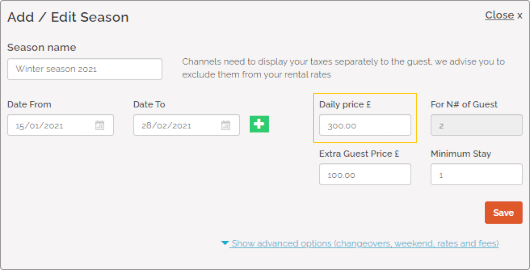
Daily price is the standard way of setting prices. It indicates the base price per night for the Standard number of guests.
Standard number of guests (N/A)
Pull_ListSpecProp_RS/Property/StandardGuests
Extra guest price (N/A)
Pull_ListPropertyPrices_RS/Prices/Season/Extra
Minimum stay
Pull_ListPropertyMinStay_RS/PropertyMinStay
Minimum stay indicates the minimum number of days a reservation can be made for. Guests will be not be able to book your property if they want to book stays shorter than minim stay. This value is mandatory to provide. The Minimum stay value is used for the availability check.

Weekend pricing
Pull_ListPropertyPrices_RS/Prices/Season/Price
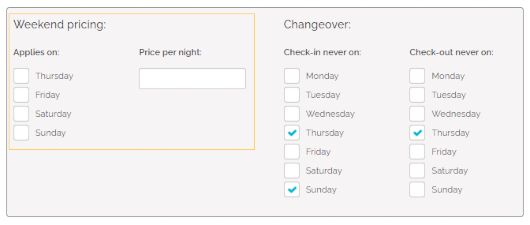
Weekend pricing refers to a specific type of pricing rules that are applied on selected weekend days only. If the weekend-specific pricing is set and the reservation matches specified criteria, then the Weekend pricing will be applied instead of the Daily price.
Occupancy pricing (N/A)
Pull_ListPropertyPrices_RS/Prices/Season/EGPS
Complimentary topics
Discounts (N/A)
Pull_ListPropertyDiscounts_RS/Discounts/LongStays
Pull_ListPropertyDiscounts_RS/Discounts/LastMinutes
Calendar
Pull_ListPropertyAvailabilityCalendar_RS
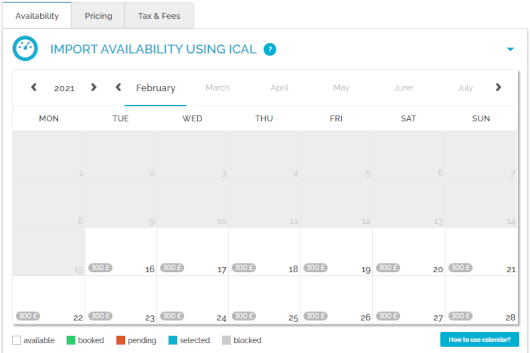
Calendar stands for the property's availability to rent. You can check here the availability of your property in the selected time frames. Once a reservation is inserted in Rentals United, the availability in the calendar gets blocked for this period. The calendar is updated automatically every time the availability of the property changes or at predefined times to remain up-to-date.
Preparation Time Before Arrival
Pull_ListSpecProp_RS/Property/PreparationTimeBeforeArrivalInHours
PTBA stands for Preparation Time Before Arrival. It is a general keyword to describe the minimum time a booking has to be made in advance in order to be accepted by the PM. The dates restricted by PTBA are normally set as not available already in the calendar. Hence, the PTBA data is already applied in availability and sent to the channel within the ARI data.
The PTBA in Rentals United blocks the availability x hours from 23:59 of the day of arrival on the property's local timezone. For example if the PTBA is set to 6 hours, bookings will be accepted until 18:00 of the day of arrival, after 18:00 the calendar will be closed. If the PTBA is set to 24 hours, bookings will be accepted until 23:59 before the day of arrival, after that the calendar will be closed.

Changeover restrictions
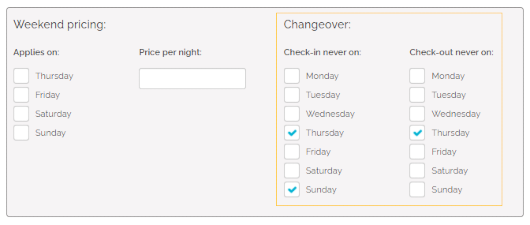
Changeover restrictions specify whether check-in or check-out is allowed for a given day. This is a great option if you need the guests checking in and out to fit your schedule and it will help you avoid unexpected guests. If some days are restricted from changeovers, then your guests will simply not be able to select such a stay if the start or end day falls on a changeover-restricted day.
Tax (N/A)
Pull_ListSpecProp_RS/Property/AdditionalFees
Fee (N/A)
Pull_ListSpecProp_RS/Property/AdditionalFees
Down payment (N/A)
Pull_ListSpecProp_RS/Property/Deposit
Security deposit (N/A)
Pull_ListSpecProp_RS/Property/SecurityDeposit
Currency
Pull_ListSpecProp_RS/Property@Currency
Currency in Rentals United is a fixed value, by default established on the basis of the property location. The currency of any property can be checked in Rentals United, go to Step 5: Price and availability after selecting All properties tab.
In case the currency of your property does not match the one in Booking.com, Rentals United will convert the pricing upon each price push.
