Manual options give you an overview of the following details:
-
price
-
availability
-
minimum stay
You can easily check what data is being sent to the channel and troubleshoot, in case something seems off.
Incorrect availability
It may happen that the actual availability on the properties is different than what we actually sent. Check the screenshot below.
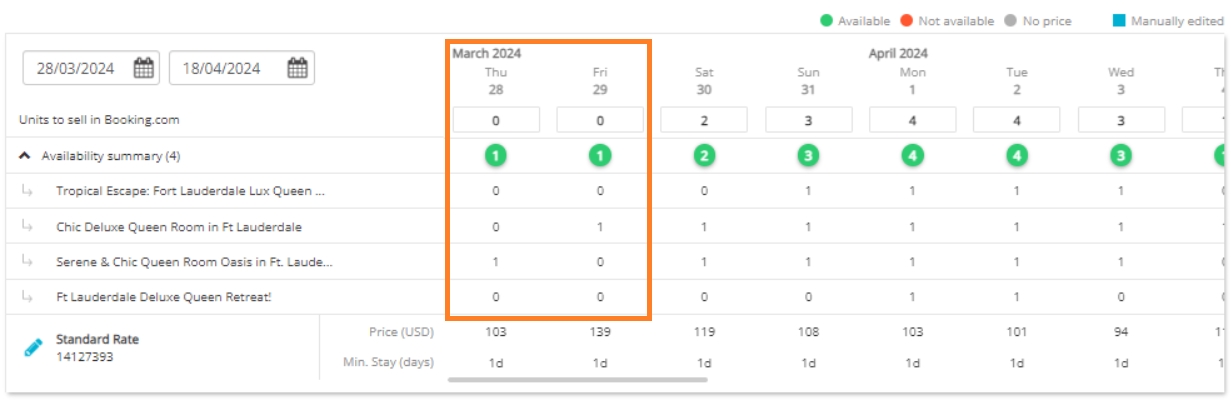
You may notice that in the Availability summary row, there is only 1 property available to book both on March, 28 and 29. On March 28, the available property is "Serene & Chic..." while on March 29, the available property is "Chic Deluxe...". Each property has 1 unit available.
However, in the Units to sell in Booking.com row, there are no units available to book (0). It means that even though there are two units available, we are sending a closed calendar for these nights.
Steps to troubleshoot
You can troubleshoot yourself and find the reason for this discrepancy before you contact our support team. There are possible steps to check:
-
Changeover restrictions: Check if these days are not closed to arrival.
-
Minimum stay: Check if minimum stay on these days does not interfere with an existing booking.
-
PTBA: Check if the PTBA settings do not force closing the availability.
-
Moves: Check if moves are enabled. See Moves algorithm for additional explanations.
-
Overbookings: Check if there are no overbooking on this date. Overbookings may decrease the availability.