Require Multi-Factor Authentication (MFA) - Multi-Factor Authentication (MFA) is an authentication method where a user is granted access only after successfully confirming the log-in attempt.
If you want to turn off the MFA (which is not recommended), check which scenario applies to you and follow the instructions accordingly.
Remember that you can only turn off the MFA for the account owner. It means subusers will still be required to use the MFA to authenticate while logging in to Rentals United. Additionally, the MFA authentication will be required every time you log in from an unrecognised IP address.
The most common cases when the IP address changes include, but are not limited to:
-
logging in from a new device or a device that has not been used for more than two weeks
-
using a dynamically assigned IP addresses
-
connecting to a different network (at work, at home or a public place)
-
changing internet provider
-
replacing the router
The above situations are customer-specific and cannot be avoided. Rentals United has no influence over this.
I have access to my username as an email
-
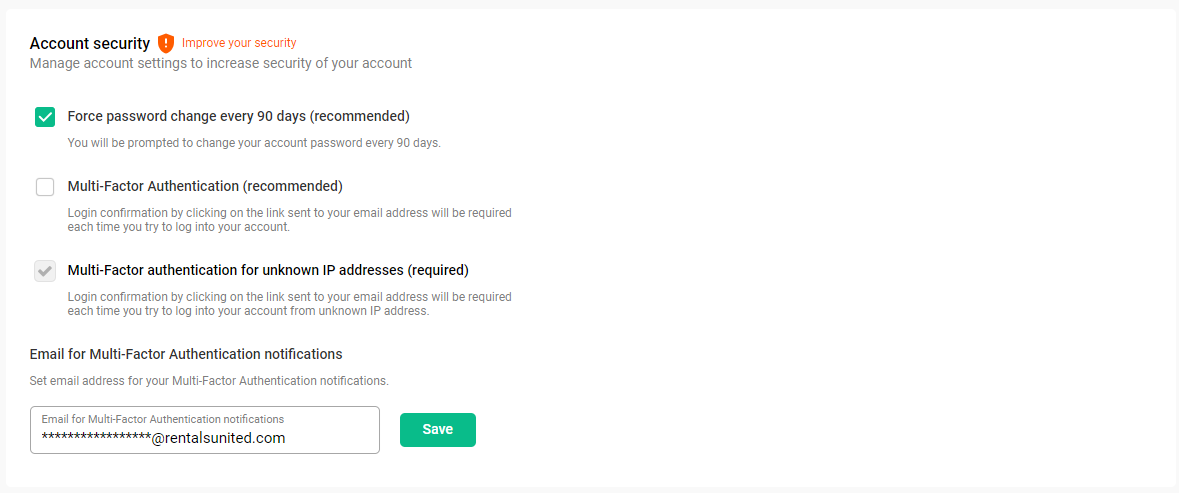
Log in to Rentals United and go to Security.
-
Find the Require Multi-Factor Authentication setting and uncheck the checkbox next to it.
-
A pop up is displayed. Provide your password to confirm the change.
-
Click Confirm.
I don't have access to my username as an email
If you are logged in to Rentals United(e.g. from another device), you can easily turn off the MFA and add an alternative email address for the future MFA notifications (e.g. that may be needed when you try to log in on a new device).
-
Go to Security.
-
Find the Require Multi-Factor Authentication setting and uncheck the checkbox next to it
-
Provide an alternative Email for the MFA notifications. Make sure that the email address you are providing here is one that you have access to. This will ensure that you do not loose access to your account in future in case the MFA is required.
-
Provide your password to confirm the change. Click Confirm.
-
Click Save!
-
Go to the email address that you have set up for the MFA notifications. You will see a confirmation email. Click the link to confirm the change.
Now, the MFA is disabled for the account owner and you have set up an email address to receive the MFA notifications in futuree.
If you cannot log in to Rentals United because the MFA authentication is already in place and you do not have access to your username email to confirm the login attempt, contact the Rentals United Support Team.