Instant booking process
To make a reservation, Agoda uses the data available in the channel. Agoda does not perform the quote request to Rentals United before the reservation is made. Rentals United retrieves reservations from Agoda every 5 minutes.
- A guest enters the reservation page on the Agoda website and provides the details of a reservation (dates, number of guests etc.).
-
If the property is available to rent, the guest completes the reservation process on the Agoda website by providing their personal data.
Note: Agoda does not quote Rentals United, but uses the information available in the channel. -
Rentals United retrieves the reservation from Agoda.
When there are several Rentals United properties connected to an HRS room type (Rentals United hotel or group), reservations will be assigned to a property depending on their moves configuration. If you are unsure about the moves configuration of your HRS room types in Rentals United, please see Moves algorithm.
Request-to-book (N/A)
Inserting reservation manually
It is always possible to insert reservation manually in Rentals United Guest Planner or from the Bookings tab. In such a case, the availability is blocked and the channel is updated.
Reservation details
When a reservation arrives, theSales Channel provides the standard guest information (such as name, surname, and phone number) along with booking details including the property name, number of guests, stay dates, and price. All of this information is available in Guest Planner > Booking details.
If you are an API user, you can get access to this information via the following API methods:
| Item | More info |
|---|---|
| Guest number |
Agoda shares information about:
Rentals United takes this information and adds up the values. You will find this information in the reservation. |
| Cancellation Policy | Agoda does not share the cancellation policy that was used in the reservation. |
Importing bookings
In case you worked with Sales Channel and received bookings prior to connecting to it via Rentals United, it is possible to import them into Rentals United to ensure all information is in one place.
Note: Only bookings held for future Rentals United will be imported. Note that this feature will only copy your bookings from Sales Channel to Rentals United. In case of modifications or cancellations of the copied bookings, the same rules as for other bookings apply.
If you have existing bookings in Rentals United, we will update them in Rentals United with the information from Sales Channel.
Bear in mind that this is a one-time action that is supposed to import bookings which were created before you have started using Rentals United or connected to Sales Channel. Any new bookings will be automatically created in Rentals United , without any need to manually import them.
In Rentals United platform, open Property Settings. Follow the steps here.
-
Find the hotel you would like to import bookings for. Hover the mouse over the three-dot menu on the account level. Click Import Sales Channel bookings.
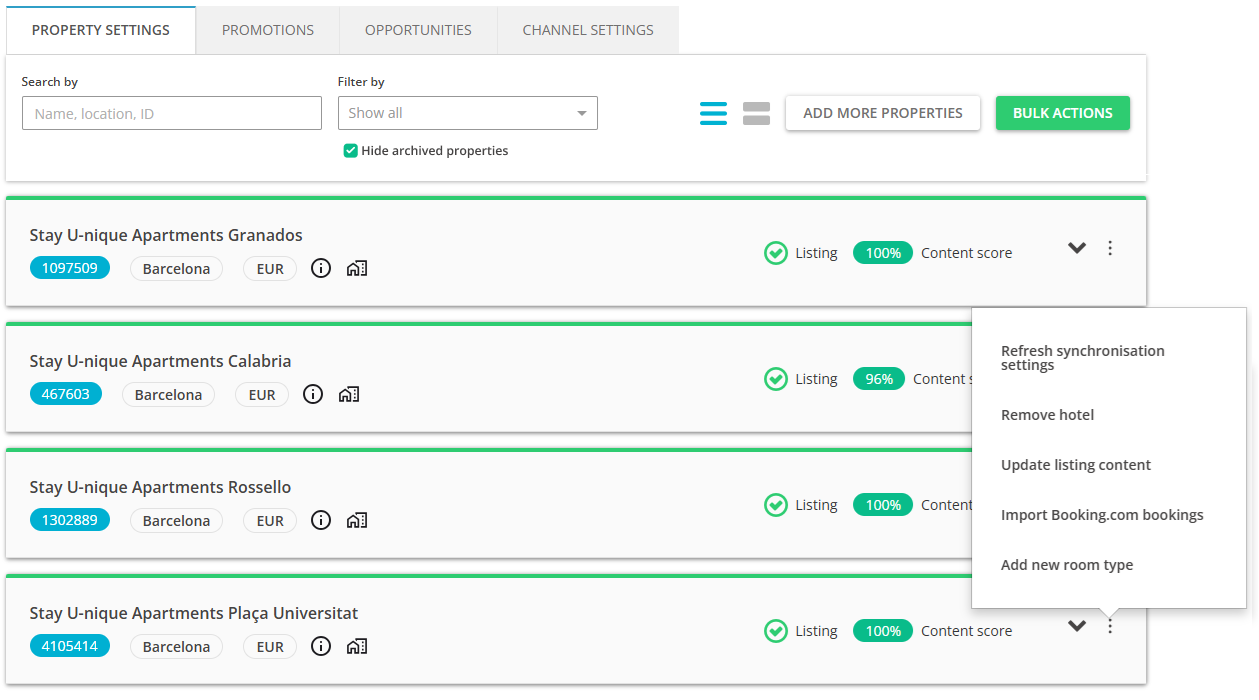 Note: You can import bookings for the whole hotel only. This means it will import bookings from all listings added to one hotel. If you have more hotels, you need to repeat it for each of them.
 - Confirmation pop-up is displayed. Click Proceed & Import to continue.
-
The process is initialized. Do not exit the page until it is finished. Depending on the number of bookings you have in your account, it may take a while to complete. Once the bookings import is complete, the page will reload. Please, verify if new bookings were successfully copied to Rentals United. You can do it directly through Guest Planner. If the process was not successful, you will see an error. In this case, try again. If the error persists, please contact the Rentals United Support Team.
Note: If some of your seasons are blocked in Rentals United and you import bookings, these imported bookings will be placed within the blocked periods anyway. They may show up as overbookings. This is only a visual issue and there's nothing to worry about.
Modifying a reservation
Modifications are initiated in Agoda and synchronized to Rentals United. They are retrieved at the same times as new reservations.
Cancelling a reservation
Cancellations are initiated in Agoda and synchronized to Rentals United. They are retrieved at the same times as new reservations.
