What is Operations Management?
Operations Management is a set of features that allows you to grow your business through:
-
task automations
-
payments and invoices automations
-
post-booking operations management
-
advanced analytics
Is Operations Management available in Rentals United App?
Currently not. You cannot access Operations Management in Rentals United App, but you can access it via web browser in your mobile device.
Just open a web browser on your phone and go to https://new.rentalsunited.com/. You can enjoy full functionality with no need to download additional apps.
Why are some tabs duplicated in Operations Management?
If you are an account owner or a subuser with a full access to the Rentals United account, you will have access to the Rentals United features (Bookings, Properties, Multicalendar,Guest Planner, Unified inbox, Operations Management etc.). If you are a subuser with access to the Operations Management only, you will see the Operations Management features only.
Hence, in order to make it possible for external service providers (such as cleaning staff, maintenance staff etc.) to access all booking and property-related information, the Operations Management includes sections similar to Rentals United.
-
Bookings - Bookings
-
Properties - Rentals
-
Multicalendar - Calendar
These sections have been described in detail, so for more information please see here.
Remember that Rentals United is the source of truth when it comes to the booking and property information and all information available in Rentals United takes priority over the information available in Operations Management.
Will the data be immediately available in Operations Management?
-
New users: real-time
-
New bookings: real-time
-
New properties: up to 3 hours
What is the synchronisation flow between Rentals United and Operations Management?
Rentals United pushes data to Operations Management.
Remember that in case the data is updated in Operations Management, it will not be updated in Rentals United.
Will I be able to use Operations Management via app?
No, currently Operations Management is not available in the mobile version. However, you can log in to the Rentals United platform and access Rentals United platform via your mobile browser. This way, you will access Operations Management in your mobile device.
Can I change the language in Operations Management?
Yes, Operations Management is supported in 4 main Rentals United languages: English, Spanish, French and Italian.
If you change the language, make sure to log out and log in for the language to switch.
How to deactivate Operations Management?
Currently, you need to contact the Rentals United Support Team and request to deactivate Operations Management in your account.
Bookings
Can the price of a booking be changed?
It is not possible to change the booking price in Operations Management. Sales Channel / Rentals United is the source of truth when it comes to the bookings and their prices.
What is the full booking flow?
-
Once a booking appears in Operations Management, the Down payment link is sent to the guest within 5 minutes (if applicable).
-
The Pre-check in form request email is sent.
See the screenshot below in case you would like to set up a strategy about reminders (First Email, Second Email etc.).
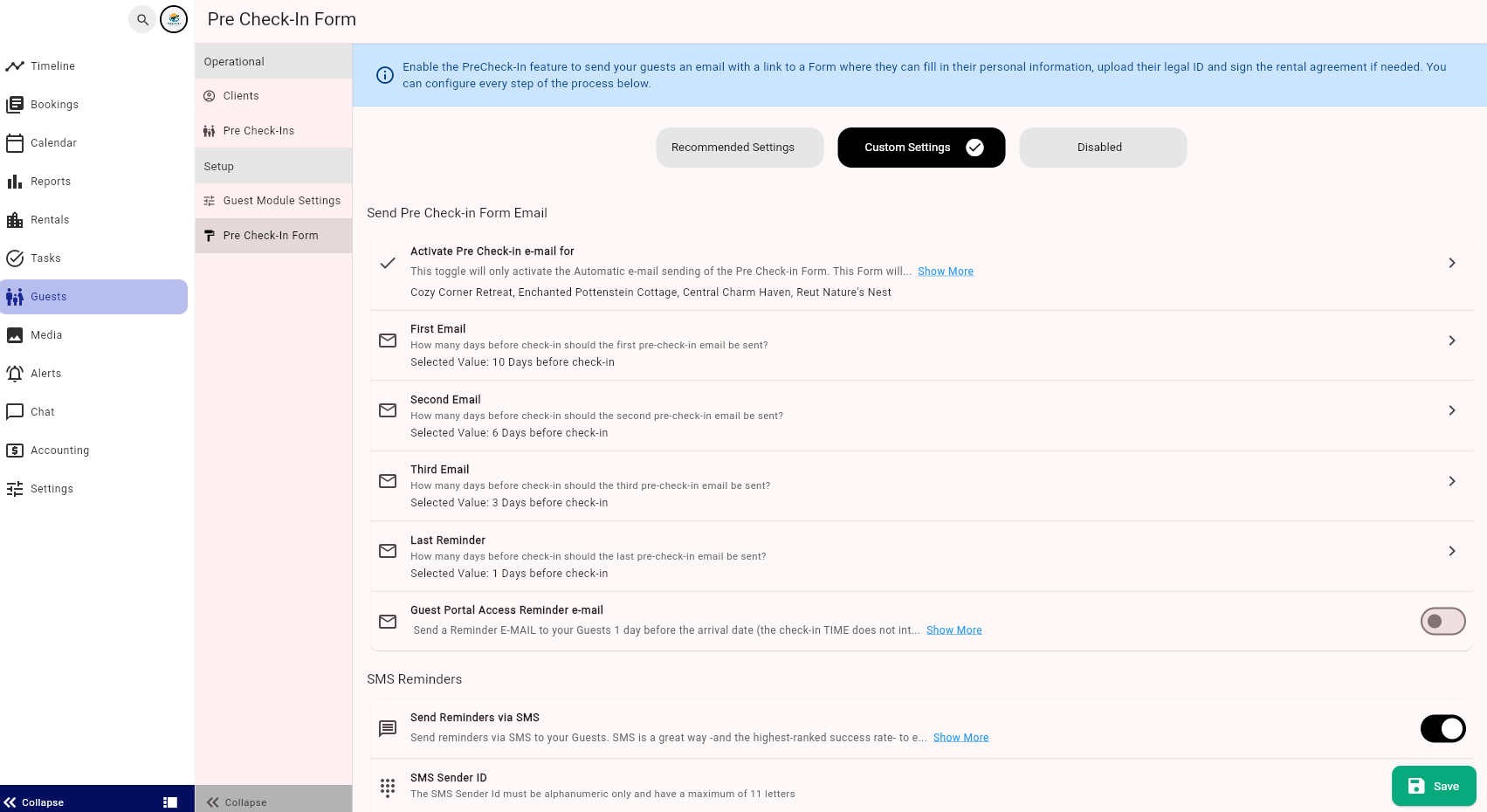
-
Once the form is filled by the guest, the guest receives a confirmation that the Pre-check in form was filled in. Any reminders that were scheduled to be sent will be cancelled.
-
After the Check-in form was filled in, the guest will receive an email with the Guest Portal access. Within the Guest Portal, the guests will be able to pay any remaining amount, having access to the Stripe connection etc.
In Guest Portal Access Reminder Email, you can set up a reminder to be sent one day before the arrival. Reminders are useful as the guests may have filled the Pre-check in form long ago. This email reminder provides again the details about how to get into the Guests Portal.
Check-in operations
Will I be able to see in Guest Communication the emails sent from Operations Management?
Partially. You will be able to see the emails sent from Operations Management (such as Pre-check in form, Guest Portal email, confirmations) in Rentals United Guest Communication only for Airbnb. Additionally, you will be able to see those in the chat app in the Airbnb extranet.
For other channels - the Operations Management messages will be communicated via email and will not be visible in the Rentals United Guest Communication and Unified inbox.
Accounting & Invoicing
Can I invoice my guests on Operations Management?
Although it is not possible to create recipients per each guest, you can still invoice your guests. See the instructions here.
Why can't I see any reports in the Statistics tab?
Most probably you cannot see any reports because you have not generated any statements. See the instructions here.
Who are typical Recipients?
Who are Recipients has been thoroughly described here.
Typically, the Recipients should be created for all people / entities that make money from the bookings. These are:
-
Property owner
-
Service providers
-
Taxes charging authorities (if you collect tax)
How to identify the names when setting up Strategies for fees and taxes?
Go to the Statements and open one of them. In the breakdown, you will see the names of the fees/taxes that are used by the sales channel.
How to set up Strategies for items that are managed by sales channels e.g. channel commissions or taxes?
There is no need to set up Strategies for anything that is managed outside of your business (which means that you do not receive the money in the net income).
Payments
How to start using Stripe?
In order to start charging your guests via Stripe in Operations Management, you need to enable this payment gateways in the Settings tab.
Follow the instructions available here.
I've been using Stripe in Rentals United before, what do I do now?
If you have been using Stripe in Rentals United before and now you want to charge with Stripe in Operations Management, you need to disconnect from Stripe in Rentals United and, later, enable Stripe payments in Operations Management.
-
In Rentals United, go to the Services tab.
-
Find the Stripe service in the list.
-
Click on the Stripe section to unfold it.
-
Click the X button in top right corner of the box to disconnect from Stripe.
-
Confirm.
Now, you have disconnected Stripe from Rentals United and you can connect to it in Operations Management.
Follow the instructions available here.
Why would I want to connect to Stripe via Operations Management?
Stripe connection via Operations Management is necessary to properly display the reservation Paid status, as well as charge the guest through the Pre-check in form or Guest Portal.
If your guests are charged by the OTAs, there is no need to set up Stripe.
Can I use Stripe on Rentals United > Services while using Operations Management?
No, you cannot. In order to see the payment status, you need to use the Stripe via Operations Management.
Follow the instructions available here.
Support
If you want to report an issue, go ahead and contact the Rentals United Support Team.
